Open Kamaru on a computer and set staff roles + 3 more updates
v1.11.2
Two new things in v1.11.2 that make Kamaru more flexible: open it in a browser at my.kamaru.app when you’re at a laptop, and staff roles whose permissions you set yourself. Plus 3 more updates that tidy up the detail pages and make message templates easier to use.
Open Kamaru in a browser
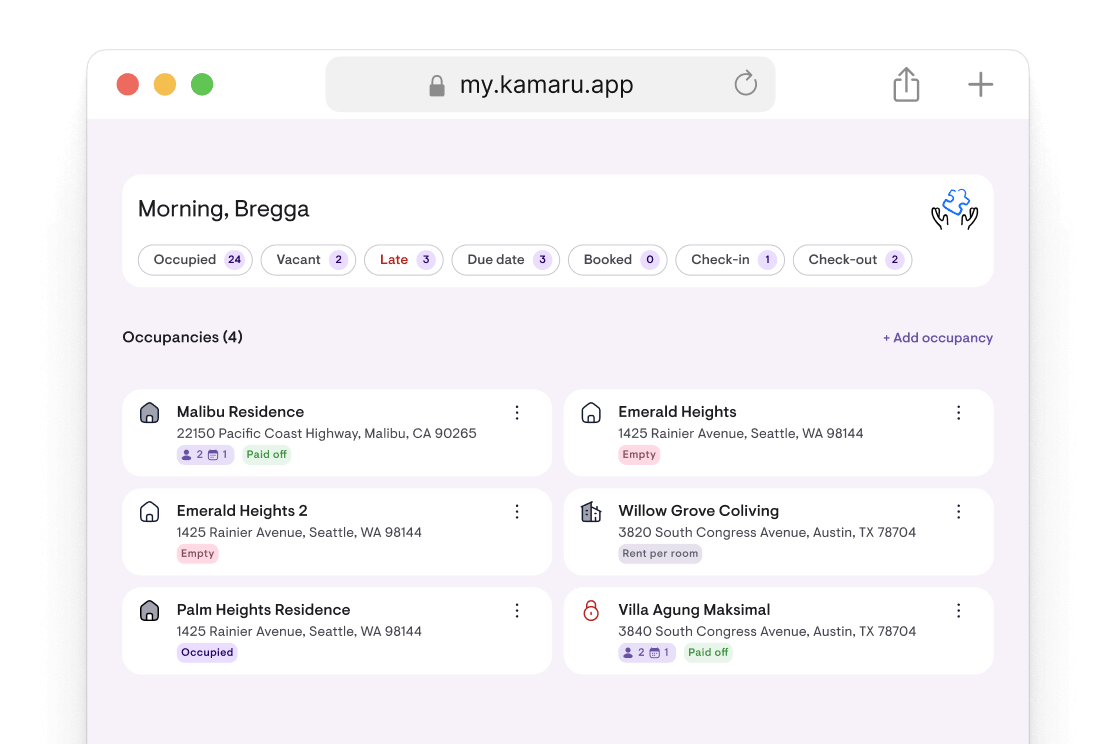
At a laptop and don’t feel like reaching for your phone? Kamaru now opens in a browser at my.kamaru.app. Sign in with the same Google or Apple account, your data is right there, nothing to set up twice.
Good for work that’s nicer on a big screen: reading financial reports, entering a batch of payments, or viewing the occupancy calendar a full month at a time. Staff can use it too, with the same permissions they have on the phone.
Everything you change in the browser syncs straight to the phone, and the other way round. One account, one set of data, two screens.
In the phone app, a new card on the property list and Profile → Access Kamaru on a computer explain how to get in. Both can be dismissed once you don’t need them.
Every staff member has a role, and you set the permissions
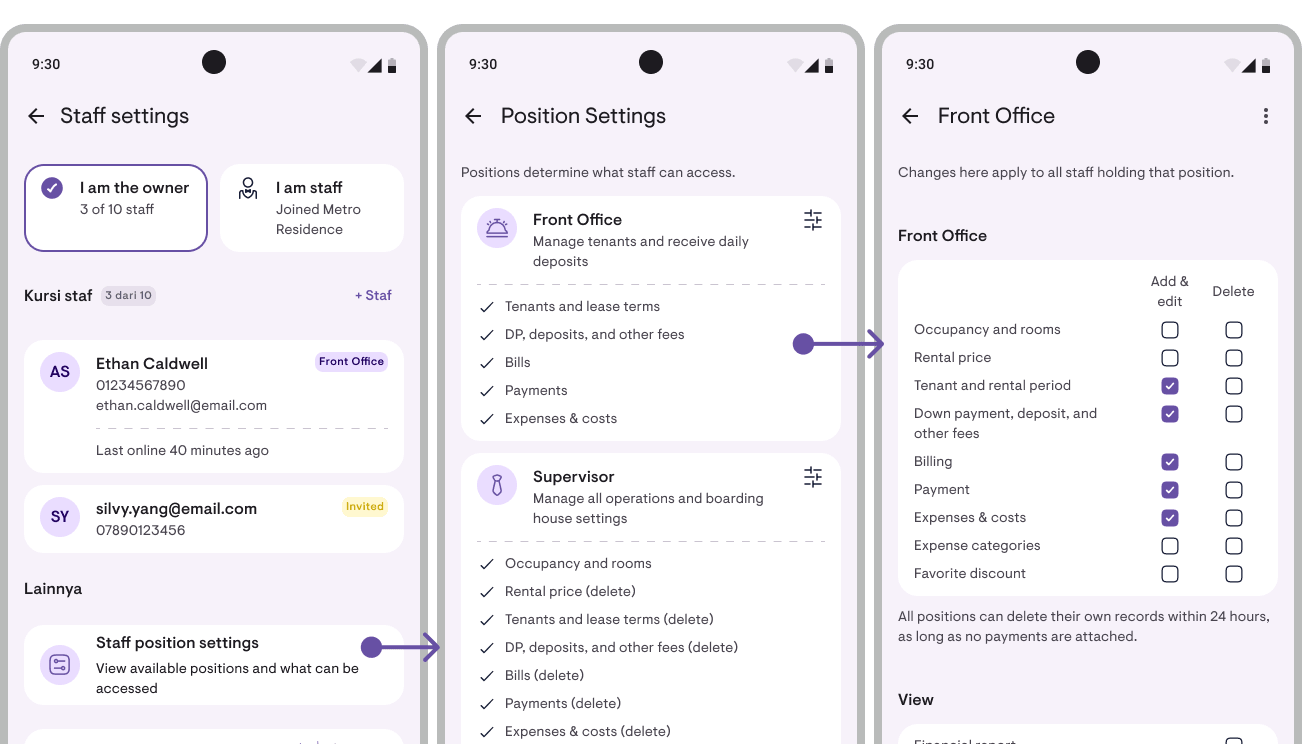
Since v1.11.0 you could add staff. Now every staff member has a role: Front Office, Supervisor, or Accounting. Each role comes with its own preset permissions, and you can adjust the preset to match how your rental actually runs.
- Front Office handles tenants and payments day-to-day. This is the default, and every existing staff member became Front Office automatically with nothing changing.
- Supervisor can do nearly everything: add and edit anything, delete nearly everything (except properties and rooms), adjust settings (except bank accounts).
- Accounting keeps the books: down payments and deposits, invoices, payments, expenses, and can read reports. Doesn’t touch tenant or room data.
Open Staff → Role settings to see three cards, one per role. Tap one to change its checkboxes: what may be added, edited, deleted, or viewed. One change applies to every staff member holding that role.
Every checkbox is a real lock, on the phone and in the database. A staff member without access sees a padlock that says “The owner hasn’t granted access”, not a confusing error.
Roles apply to all staff, on Pro (1 seat) and MAX (up to 10 seats).
Plus 3 more updates
1. Room and property detail pages are now tabs. Room detail used to be one long page you scrolled through. It’s now split into tabs: Tenants · Prices · Transactions · More, each with its own add button. Property detail works the same way. Faster to find what you’re after, and on a tablet the tabs don’t stretch across the whole screen.
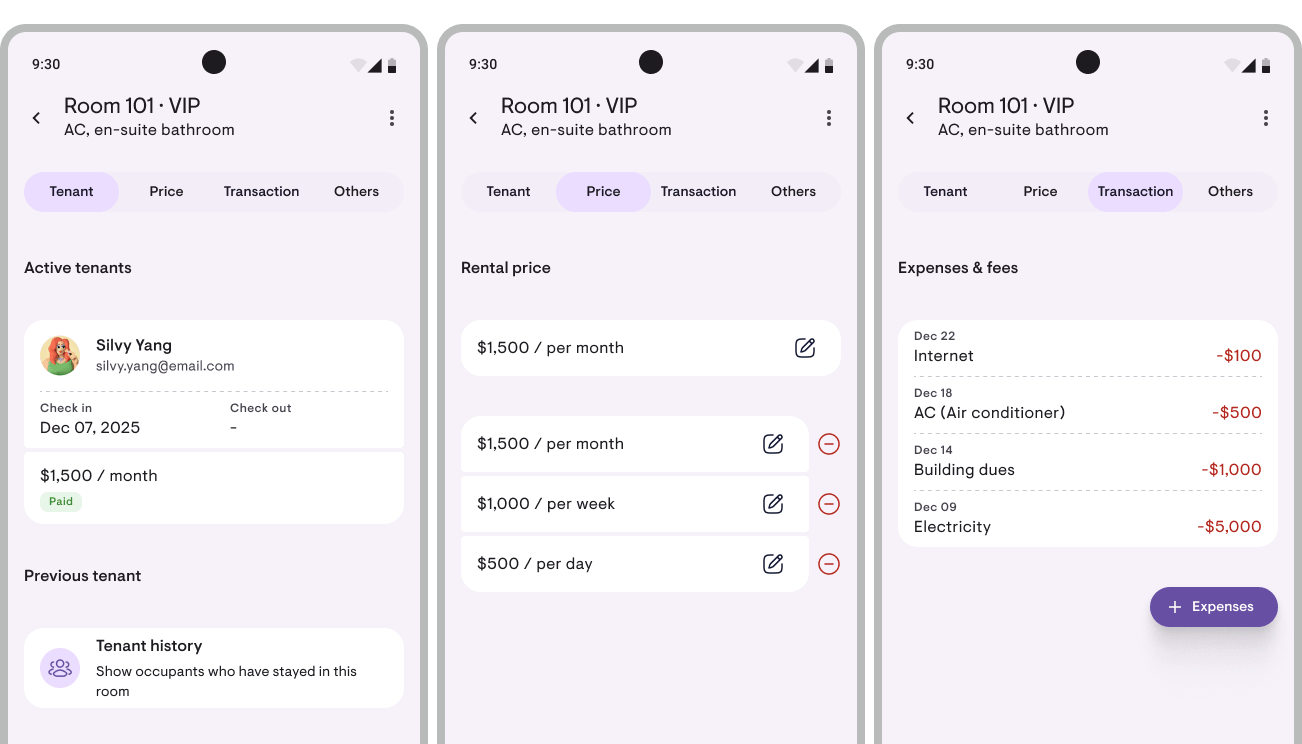
2. Internal notes on every room and property. A place for things that are only for your team: where the spare key is, when the AC was last serviced, when the electricity bill is due. Open Room detail → More → Internal notes. As many as you need per room or property, never printed on anything sent to a tenant, and every staff member can read and write them. Free up to 5 notes per room or property, unlimited on Pro and MAX.
3. Translate a message template into another language. Have tenants from abroad? Open Edit message template → More → Translate, pick from 23 languages, and the template is replaced with the translation. Placeholders like the tenant’s name and the amount stay intact. Not right? There’s an Undo button. Free on every plan.
Improvements & fixes
- Forgot your password? There’s now a button for it on the sign-in screen. A 6-digit code goes to your email, enter it in the app, set a new password.
- Contact Kamaru from the sign-in screen if you can’t get in. Icon in the top right.
- Confirmation before deleting a profile photo, ID photo, property logo, or all notifications. Things that can’t be undone now ask first.
- Notes on rental prices, such as “AC” or “promo”, so two monthly prices with different amounts don’t get mixed up.
- Down payment and rent on one invoice, no need to split them into two documents.
- Photos load faster and use less data, since the app fetches a small version for avatars and cards.
- The empty screen says when sample data was deleted, so it doesn’t look like your data went missing.
And plenty of smaller fixes that make Kamaru better.
Kamaru grows with your rental ❤️
This update is about flexibility: Kamaru is no longer phone-only, and staff are no longer one-size-fits-all. An owner with two people in the office can now say “you handle tenants, you handle the books” and Kamaru keeps the boundary.
These features came from your stories: “I’m at a laptop more than a phone” and “my staff don’t need to see everything, just what they work on”. Thank you for telling us.
Two ways we build Kamaru together:
- Profile → Feature requests → straight from the app, into our inbox. We chat via WhatsApp or Email.
- Reviews in the store → 20 seconds. Beyond helping the app’s ranking, reviews are also a signal to us on which features are worth continuing and expanding.
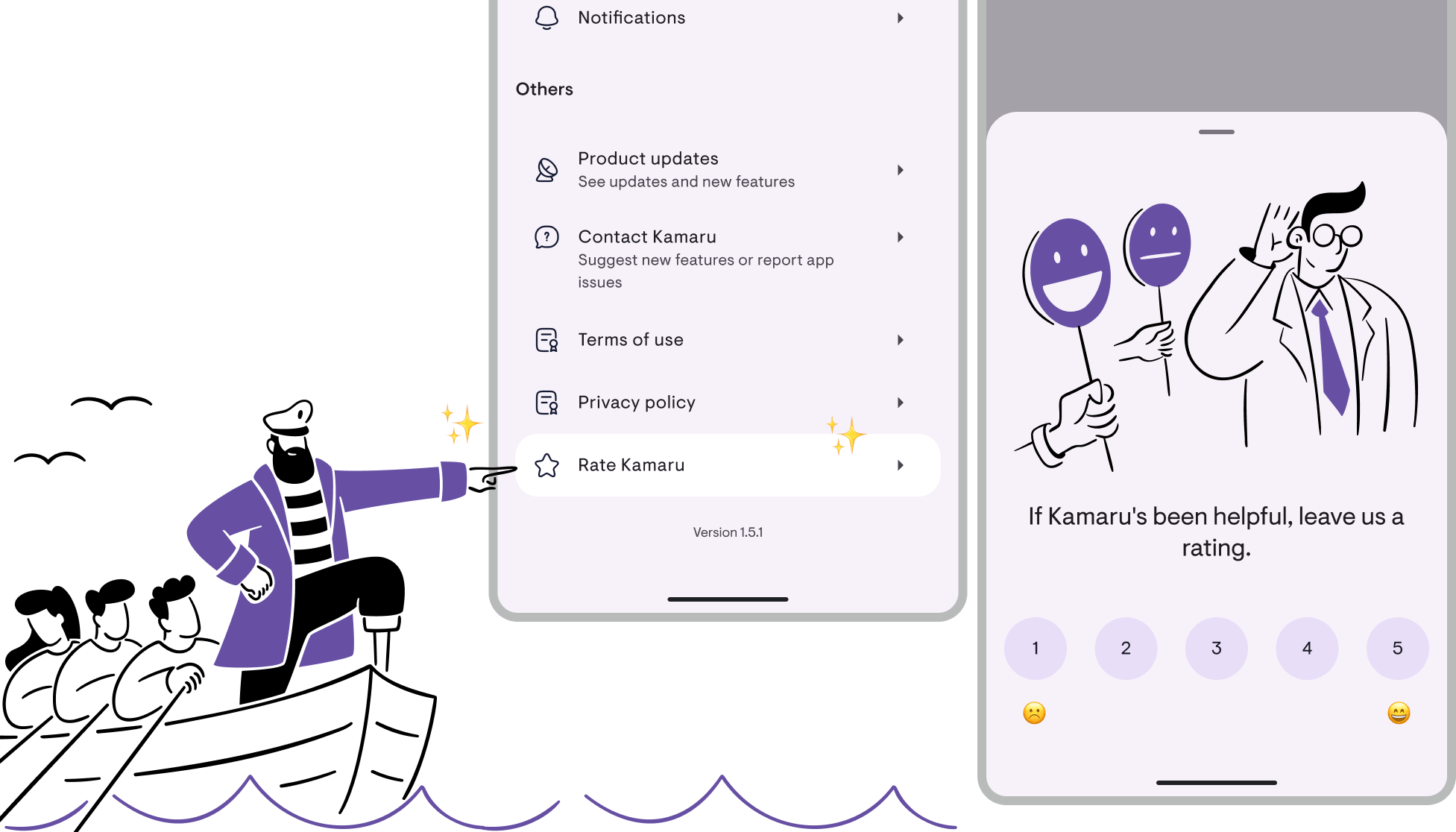
We read every review, so if this update helps, please tell us.
Bregga / founder of Kamaru
Staff now on Pro, the stay badge becomes a countdown, signatures on documents + 5 more updates
v1.11.1
Three new things in v1.11.1: staff are now available on Pro, the stay badge becomes a countdown to the next collection, and your name plus signature on invoices and receipts. Plus 5 supporting updates.
Staff now on Pro, Max rises to 10 seats
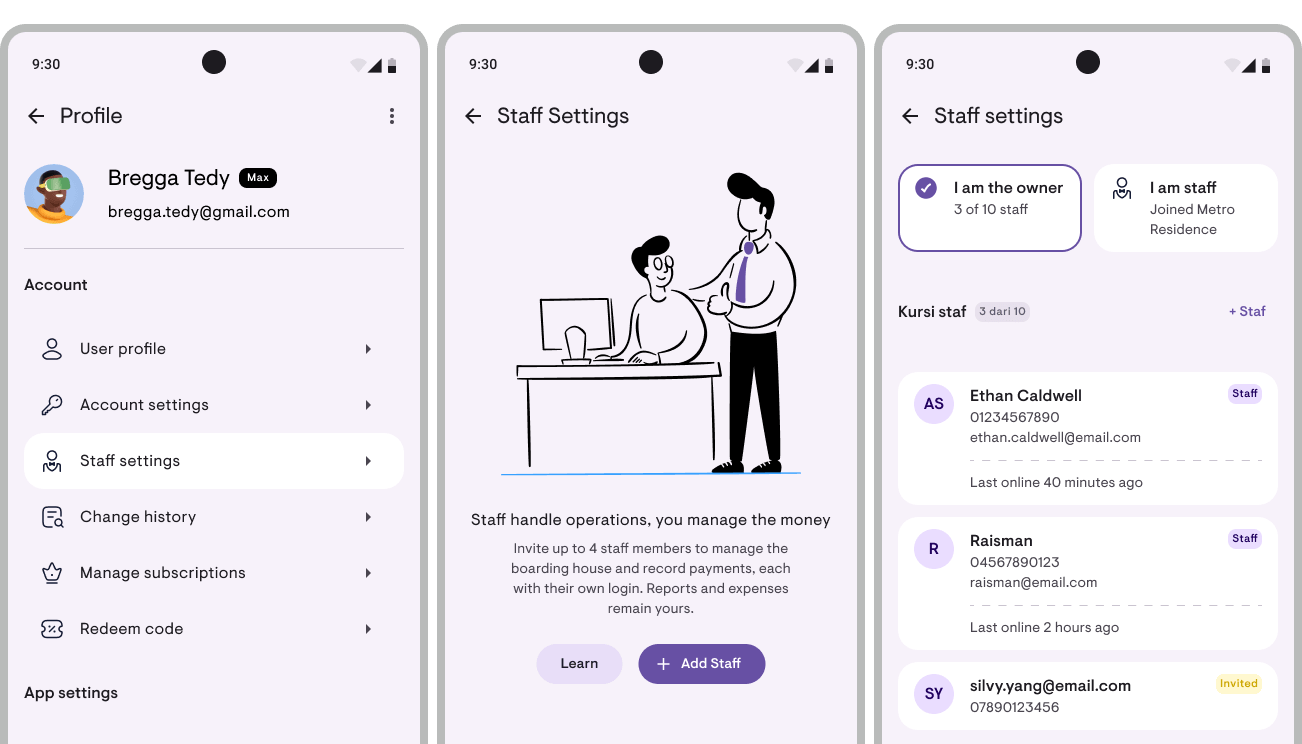
Last month staff were a Max feature only. Now Pro includes 1 staff seat with its own login, and Max rises from 4 to 10 seats.
Why does Pro get a seat but no activity history?
The resource-hungry part isn’t the seat, it’s the history. So we traded: Max rises to 10 seats with retention dropping from 6 months to 3, and Pro gets the seat without the history.
If a plan drops from Max to Pro, the most recently joined staff are switched off down to the new seat count. Nobody is removed.
When was each staff member last online?
On the staff page, every person carries a line saying when they last opened Kamaru. Someone who never has is stated outright rather than left blank. Sign-ins are recorded in the activity history too, including the owner’s own, because a record that only points one way isn’t a record.
The stay badge becomes a countdown
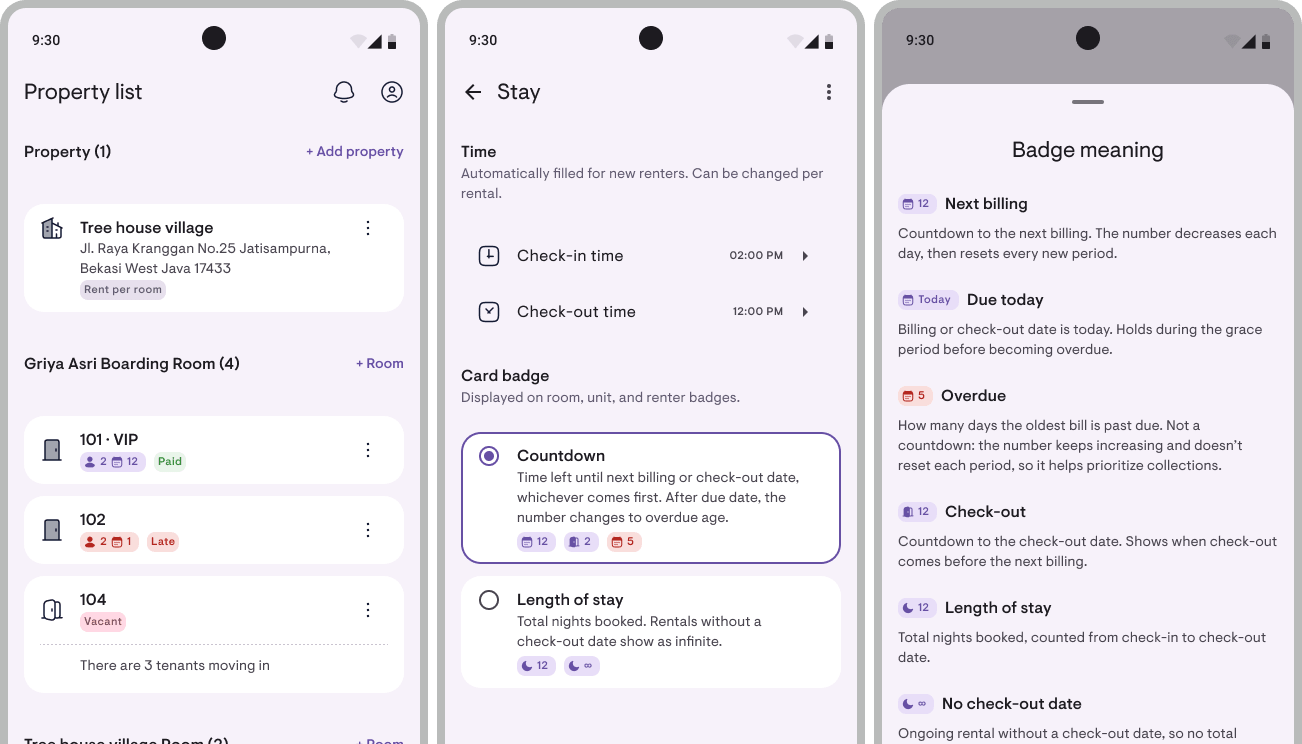
The badge on a tenant row used to show the number of nights between check-in and check-out. A figure that never changed, and one that collapsed into an infinity symbol for monthly rentals with no move-out date.
Now it answers the question people actually use it for: how many days until this tenant needs chasing. The figure is payment-aware, so someone who paid three months ahead isn’t told to pay today. Once the due date passes, it becomes the age of the debt, exactly the number the arrears report prints.
Anyone who preferred the old reading can switch back under Profile → Stay → Card badge.
Name and signature on invoices and receipts
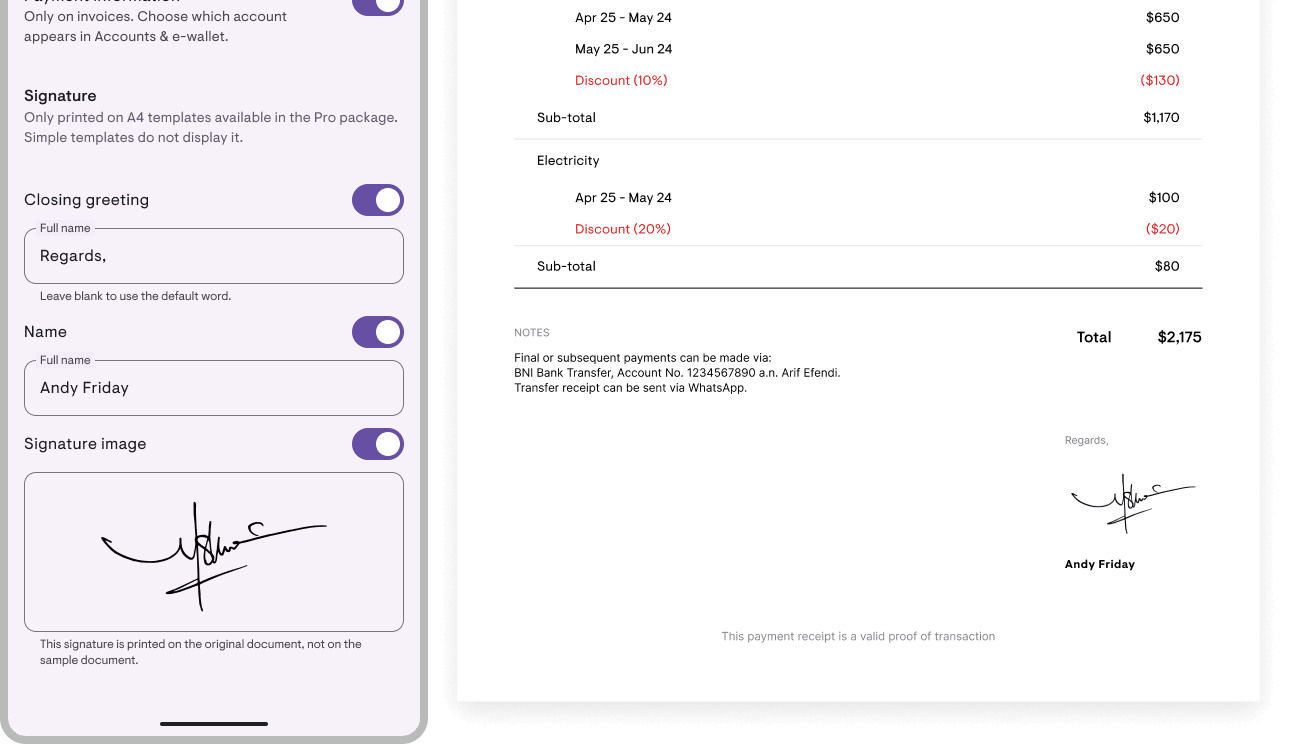
Two owners asked for the same thing, and the second gave the deciding reason: their tenant is billed to a company, and that company’s finance desk rejects a receipt with no recipient name and no signature on it.
There’s now a closing block at the foot of every A4 document (invoices, receipts, deposit return receipts, across the Professional and Minimalist templates): a greeting, the signature, a rule, and the name. The signature is drawn directly in the app, and comes out as vector in the PDF. All three new switches in Document template start switched off, so documents you already send won’t change.
Plus 5 more updates
1. Time format is now your choice. Under Profile → General settings → Time format: follow the device, 12-hour, or 24-hour. Per person rather than per account, so staff can read time their own way.
2. The calendar can print portrait. An Orientation picker under the period selector: landscape fits roughly 23 room rows per page, portrait about 35. Your last choice is remembered.
3. The check-out date picker opens on what’s already paid for. It used to open on today, so for a tenant paid through 10 September the owner had to scroll forward themselves.
4. An occupant’s stay card names the lease holder, with their photo, and tapping it opens their details.
5. Currency moved to General settings, directly under Region, because the region is what picks it.
Notable fixes
- Staff access ends with the plan, rather than waiting for the owner to open the app again.
- Staff can add a tenant again. It used to fail with a raw error message and leave half-written data behind.
- Error messages on a failed save are readable now, rather than a truncated technical message.
- Rent increases on invoices are calculated correctly. The rent line for a period after an increase used to carry the old price.
- Editing a check-out date no longer overwrites payment status.
And plenty of other small fixes that make Kamaru better.
We Listen And We Don’t Judge We Fix It ❤️
Last month we shipped Max accounts with 4 staff seats. The feedback that came back was uniform: why should this need Max when all I want is one person helping me record payments? Fair point, so this update gives 1 staff seat on Pro, and raises Max to 10 seats for the people whose teams really are that size.
The signature feature above came from two owners asking for the same thing too. Kamaru is built by a small team with no investors, so what gets built is decided by what’s actually needed.
Two ways we build Kamaru together:
- Profile → Feature request — straight from the app, straight to our inbox. We’ll continue the conversation over WhatsApp or email.
- Review on the store — 20 seconds. Beyond helping the app climb the rankings, a review tells us which features people actually use.
We read every review, so if this update landed for you, please tell us.
— Bregga / founder of Kamaru
Add staff and monitor their activity + 5 more updates
v1.11.0
Two new things in v1.11.0 that let your rental run without needing your hands on every task: you can now add up to 4 staff members to handle daily work, and track their activity history for the past 6 months so you know who changed what. Plus 5 more updates that make daily ops faster.
Your rental can now have a team
Rental grown and you’re starting to need help? Your account can now have up to 4 staff members to handle tenants and payments day-to-day, while property setup, rooms, and rental prices stay with you.
Owner stays owner: staff can’t add, edit, or delete properties, rooms, or rental prices. They just help with daily work: recording payments, sending invoices, updating tenant data.
This feature is part of the new MAX tier. Why not in Pro? Because we need to log every staff action, and that takes a lot of resources (database, logs, backups, and more) to keep it transparent and owners feeling safe. All of that isn’t cheap.
You stay in control through activity history
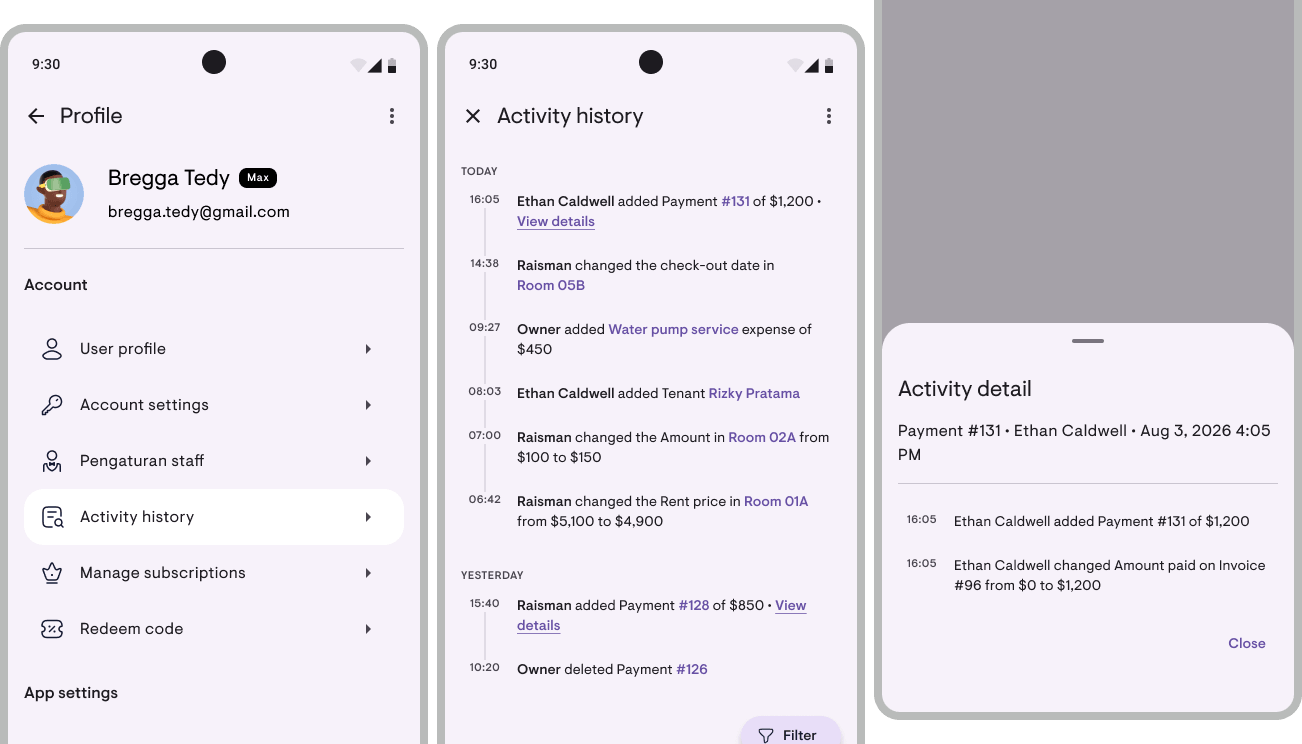
Delegating to staff doesn’t mean losing control. Activity history gives you visibility for the past 6 months: who changed what, and when.
Filter by person (you vs a specific staff member) or by date to check what staff X did this week, or what changed on a specific tenant. Export to Excel for archiving.
Financial reports are for owners only
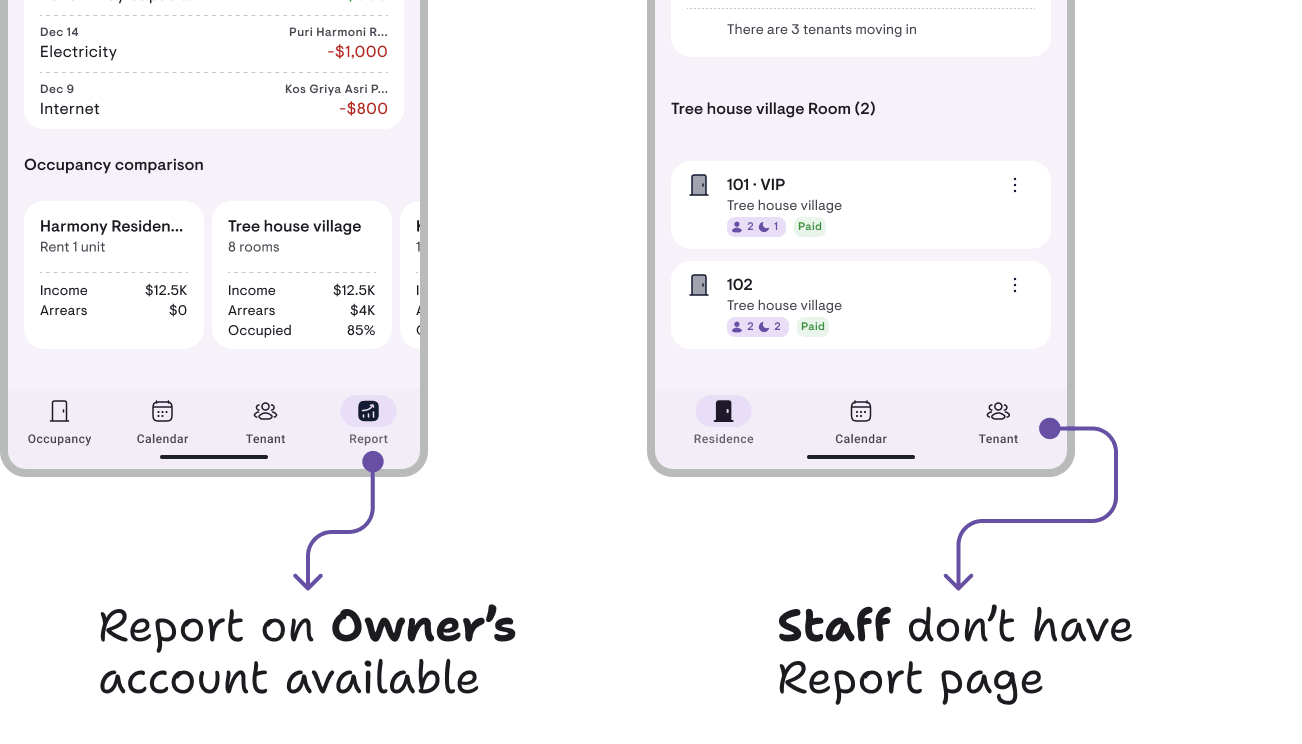
Staff handle daily operations: recording payments, sending invoices, updating tenant data. But financial reports (Income, Expenses, Balance Sheet, Cash Flow) are only accessible to you. The Reports menu doesn’t even show up in their app.
Financial data stays owner-private. Staff know what they’re working on (operational data), owners know the big picture (numbers).
Plus 5 more updates
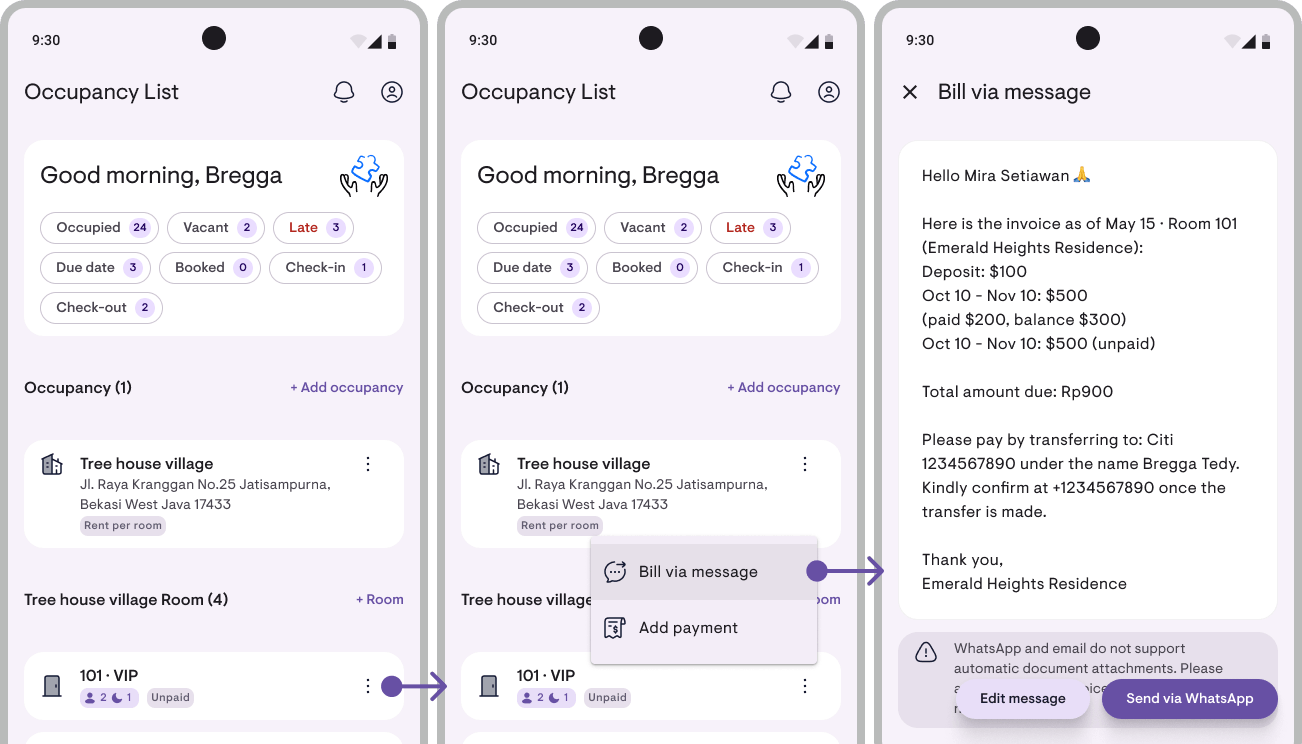
1. Bill via message without needing a formal invoice first. Until now, billing via WhatsApp meant creating an invoice first. But most landlords run Book A (obligation-based) and rarely create formal invoices. Now Bill via message composes directly from lease data: unpaid rent periods, down payment, deposit, other charges. Available on room cards, property cards, and every outstanding row on the obligation card. Items are selectable (even just one), amounts already deducted for discounts and previous payments. Free for everyone.
2. Pay rent for several periods at once. Previously, adding advance rent was one tap at a time. Now the “Next rent” row opens a sheet with a counter: type 12 for a year (if monthly), and all periods get added at once. The total preview is calculated per period, so if there’s a price change mid-run, the result stays accurate.
3. Bi-monthly invoicing. The new bi-monthly cadence joins the existing list (daily, weekly, bi-weekly, monthly, 3-monthly, 6-monthly, yearly). Good for rentals whose tenants prefer paying for 2 months at a time without committing to 3-monthly.
4. Bank accounts scoped per property. Property A collects to BCA and property B collects to Mandiri? Now each account can be scoped to a specific property, so it only shows on that property’s invoice. Default: all properties. Free.
5. App map. Wondering where feature X lives? There’s now an interactive map showing Kamaru’s end-to-end flow: from properties, to tenants, to reports. Tap any node to jump straight to that screen. Also great for new staff who are onboarding.
Improvements & fixes
- Filter Home by check-out to see which tenants are leaving this month. Plus select which status pills to display.
- Add tenants straight from an empty room card: long-press a room card → menu → Add tenant.
- Second tenant name shows on room cards. Previously only the primary tenant showed. Now it’s visible when a room has more than 1 occupant.
- Property logo now shows on property cards. Previously only on documents.
- Move from monthly to yearly plan without cancel-and-restart.
- Close deposits without deductions when there’s nothing to deduct.
- Clear filters with zero matches in one tap, no need to hunt for the control.
- Name initials show in the app bar if no profile photo is set.
And many other small fixes that make Kamaru better.
Kamaru grows with your rental ❤️
This update isn’t just about adding features, it’s about adding capacity. Staff + activity history = Kamaru now works for operations with more than 1 person, all accountable and traceable. Bill via message = daily work moves faster, matching how most landlords actually work.
These features are big because we listened to stories from landlords who said “I already have 3 properties, it’s hard to handle them all alone” or “I want my team to help without me handing over my account password”. You’re the ones who made the direction of this update clear.
Two ways we build Kamaru together:
- Profile → Feature requests, straight from the app, into our inbox. We chat via WhatsApp or Email.
- Reviews in the store, 20 seconds. Beyond helping the app’s ranking, reviews are also a signal to us on which features are worth continuing and expanding.
We read every review, so if this update helps, please tell us.
Bregga, founder of Kamaru
Bank accounts on invoices, note for tenants, redesigned tenant list + 3 more updates
v1.10.1
Three new things in v1.10.1 you’ll notice right away — bank/e-wallet accounts printed automatically on every invoice, default notes you type once, and a tenant list you can search with payment status per tenant. Plus 3 supporting updates.
Bank accounts on invoices
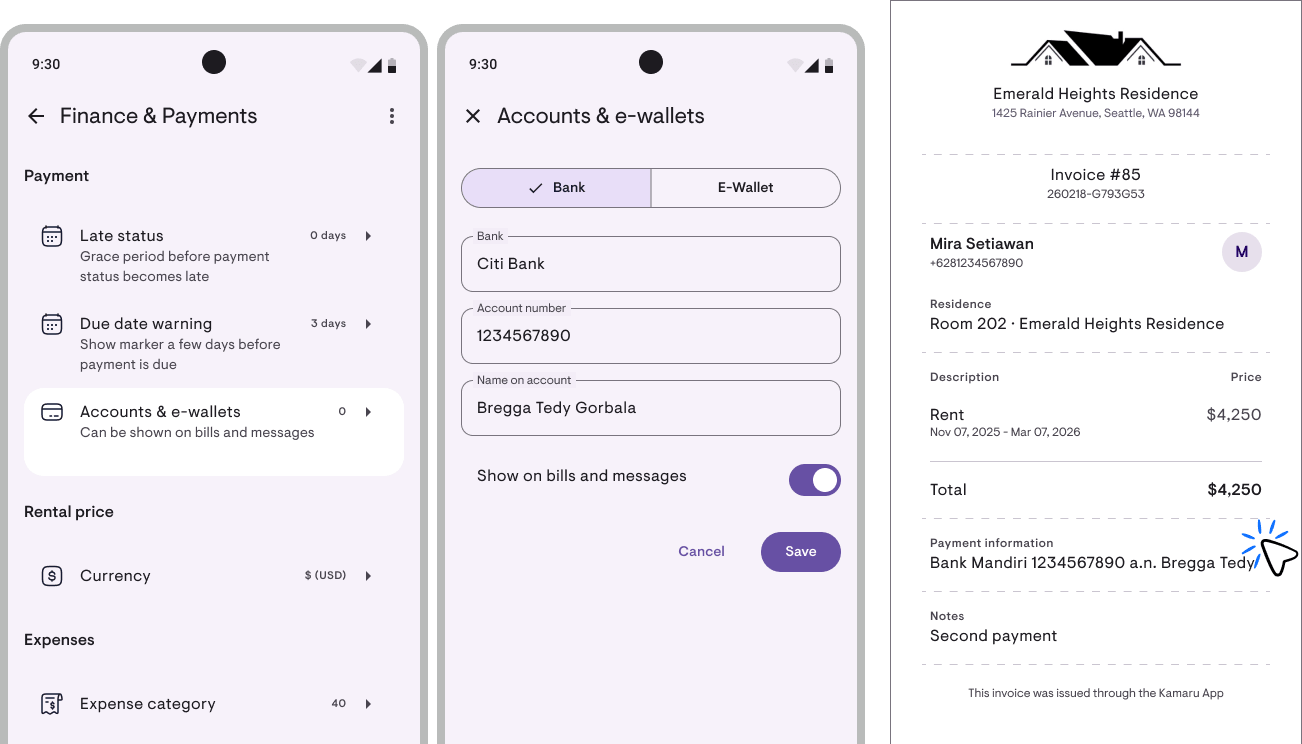
The bank account numbers you used to type into Catatan every time you made an invoice — now typed once in Profile → Finance & payments → Bank & e-wallet. Up to 3 accounts (primary bank, backup, e-wallet). Whatever’s switched on automatically appears in the invoice PDF footer + WhatsApp payment message.
This feature came from three separate kos owners asking for the exact same thing.
Note for tenants, typed once
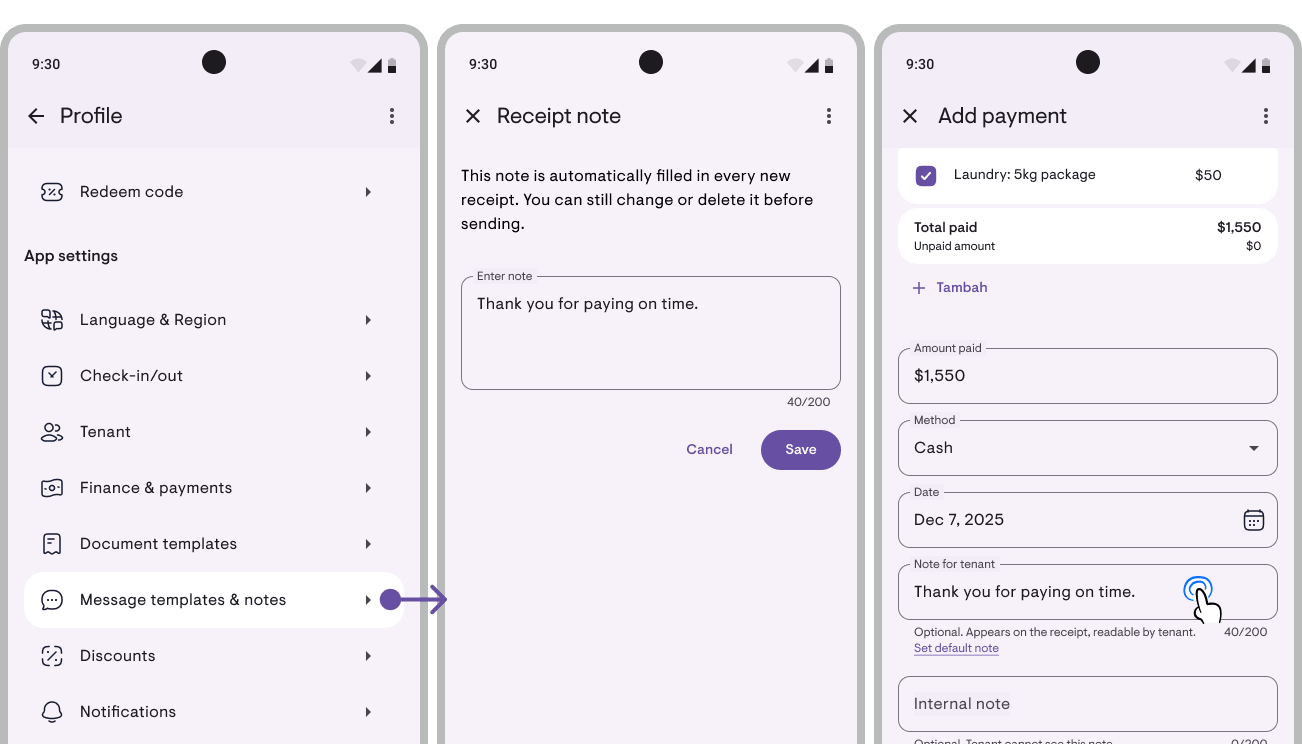
That closing sentence on invoices/receipts that’s always the same — set the default once in Profile → Message & note templates, and it auto-fills every new document. Still editable per document. Defaults are separated between invoice and receipt because the context differs: invoices are usually about payment reminders, receipts about thank-yous. Free for everyone.
Redesigned tenant list
The Tenants page now shows payment status (Paid / Partial / Late / Unpaid), stay badges, and full room names per tenant. Plus a search feature — search icon in the filter chip row, search by name, phone, email, ID number, or room number. Two columns on tablet.
Now the Tenants page answers “who owes me money” without tapping into each one.
Plus 3 more updates
1. Archive expense category. Default categories (Electricity, Water, etc.) can now be archived to keep the picker tidy — expenses using that category stay intact, past reports still read right.
2. Improve device sync: now in background. Sync existed before but only ran on cold start + pull-to-refresh. Now it’s automatic in the background — record a payment on your phone, and 45 seconds later your iPad updates without a manual refresh.
3. Improve booking status: check-in no longer locks after DP. Tenant paid a DP for a booking and now asks to reschedule the move-in? You can now edit check-in date directly on the form. Before, the date locked on any payment — even a DP that anchors no date.
Important fixes
- Default grace period is now 1 day (was 5). Owners who never manually set it move to 1 day.
- Check-in dates at month-end (30/31) no longer drift after February.
- Prepaid periods now record correctly in reports — server fixed + backfilled.
- Multi-month invoices (quarterly/yearly) in accrual reports now correct — used to recognize all in month 1, now split per month.
- Pasting phone numbers from WhatsApp no longer corrupts them — the +62 851-… that used to become +62 628 51… (doubled country code, 2 digits lost) is now safe.
And plenty of other small fixes that make Kamaru better.
What you see is only part of it ❤️
This update has a lot in plain sight — Bank accounts, Notes, redesigned tenant list. But most of the actual work is behind the scenes: default grace period we changed from 5 to 1 day after surveying 36 owners, check-in anchor that no longer drifts after February, prepay from 4 owners that was undercounted and we backfilled on the server. Work you probably didn’t know was happening.
If Kamaru feels more stable, more accurate, less worrying — that’s the result of work that usually isn’t visible. We’re a small team, self-funded, no investors. The only way we know what’s worth continuing is if you tell us.
Two ways we build Kamaru together:
- Profile → Feature request — straight from the app, straight to our inbox. We’ll continue the conversation via WhatsApp or Email.
- Review on the store — 20 seconds. Beyond helping the app climb the rankings, a review is a signal to us that the polish + fixes in the background are worth continuing.
We read every review — so if this update landed for you (even just one small part), please tell us.
— Bregga / founder of Kamaru
Payment status on the calendar, double booking prevention, occupant roster + 5 more updates
v1.10.0
Three new things in v1.10.0 that you’ll notice right away, payment status colours on the calendar, a warning when a room is already booked by someone else, and a proper occupant roster per lease. Plus 5 supporting updates for everyday work.
Payment status on the Calendar
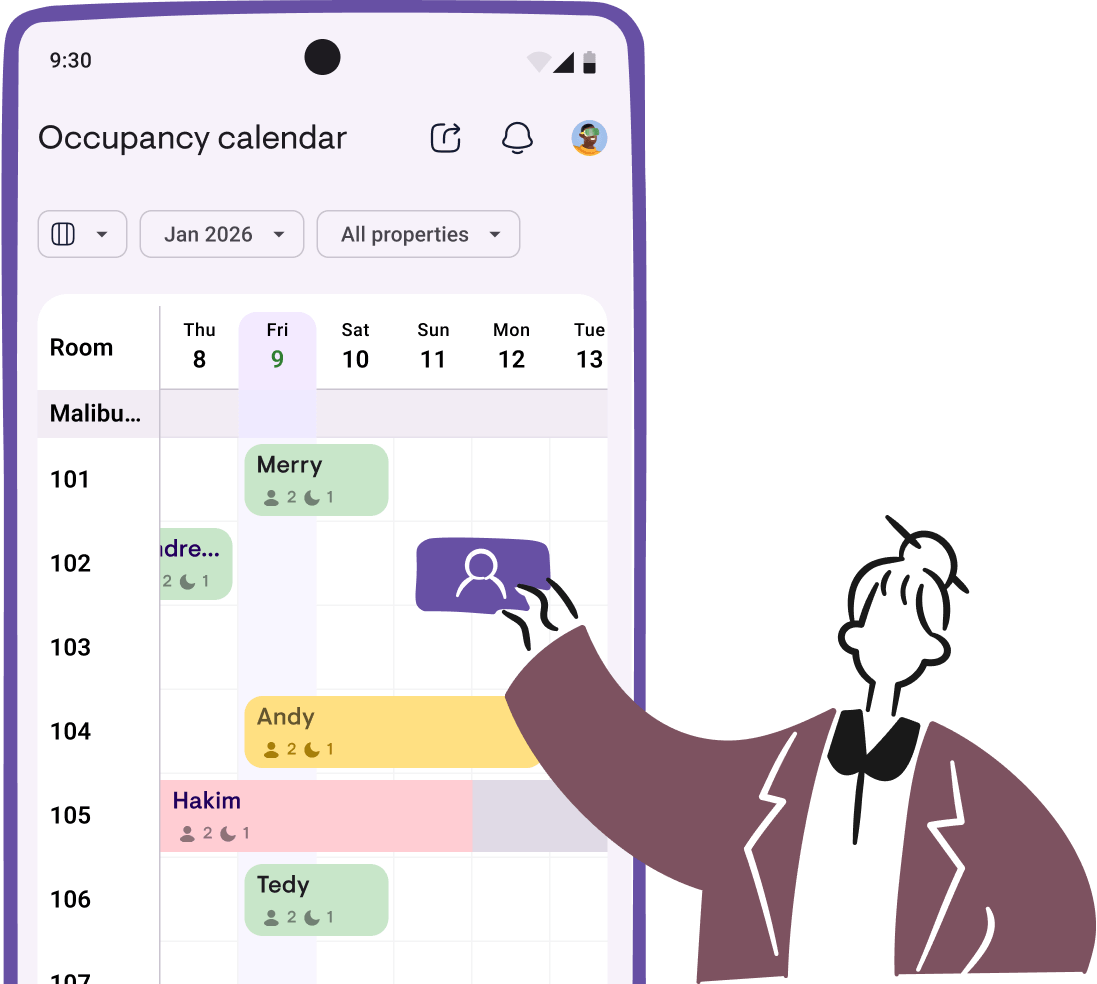
Each rent period on the calendar now has its own colour based on payment status, Paid, Partial, Late, or Unpaid. Open the calendar and you can see at a glance who’s settled and who needs chasing. The colours carry through to the PDF export.
This feature came from a request by a landlord in Maluku, 14 June 2026.
Prevent double booking
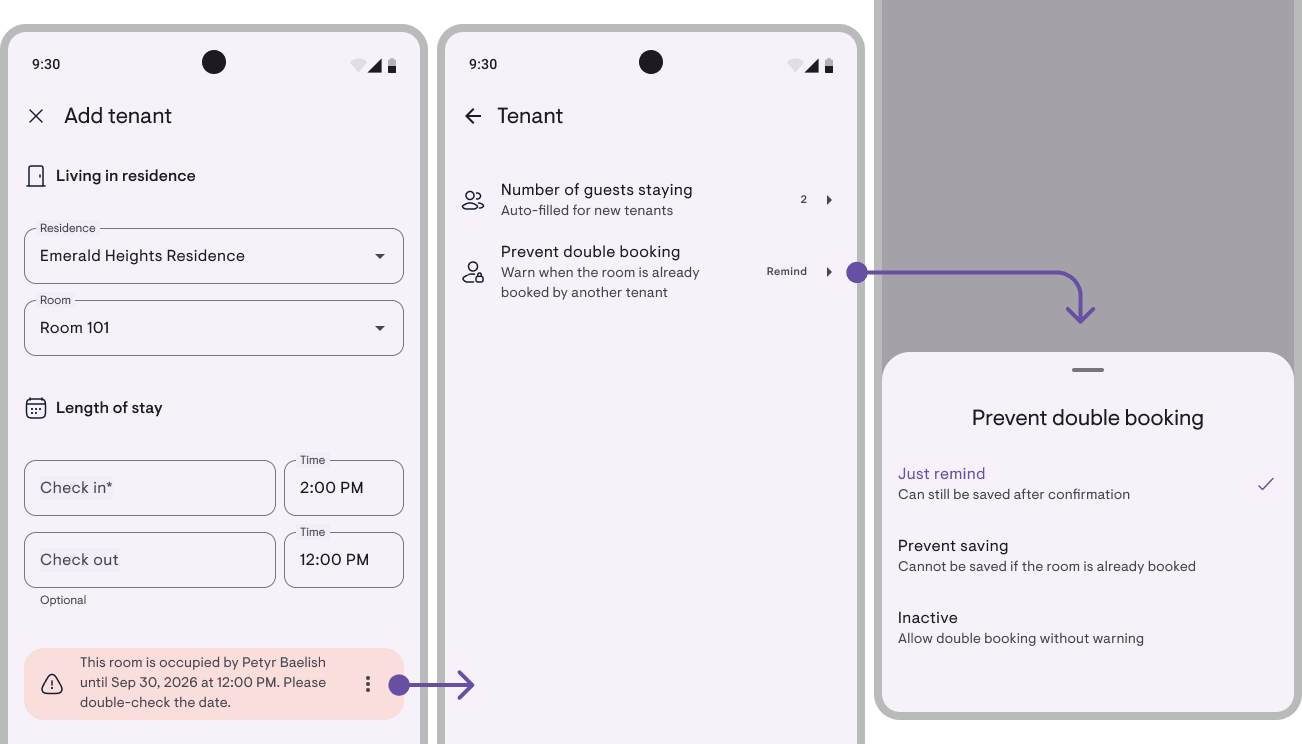
Adding a tenant to a room whose dates were already taken, that used to save silently. Now the app warns you (or blocks the save) when a new lease overlaps in time with an existing one on the same unit. A 1–31 July stay conflicts with one starting 15 July, even though no single date is typed twice.
Set it under Tenants → Prevent double booking: Warn only (default), Block save, or Off. Same-day turnover still works. Free for everyone, not just for Pro accounts, this is about preventing fundamental mistakes, not adding a premium extra.
This feature also came from a landlord’s request.
Record every occupant, not just the count
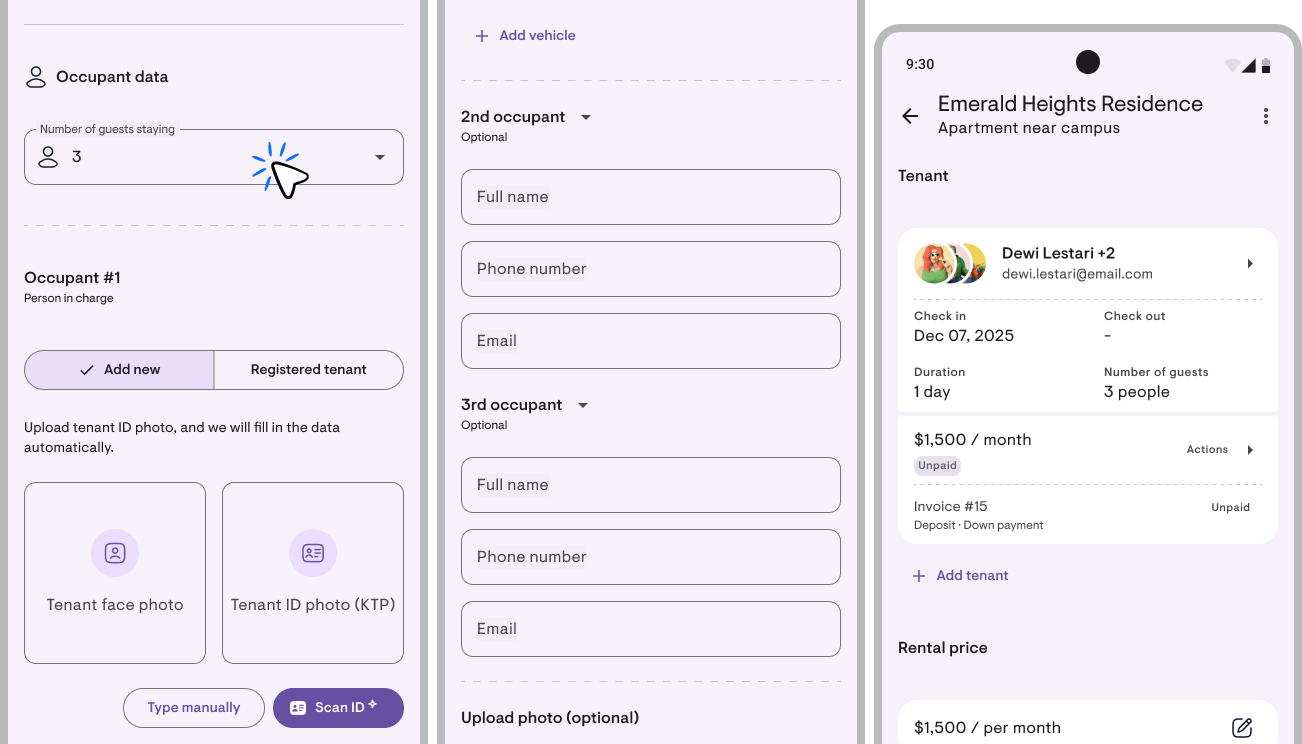
Rooms shared by a couple, siblings, or a group of friends used to just show up as “Guest count = 2 or 3”. Now each occupant can be recorded individually: name, phone, email. Raise the guest count on the Add/Edit tenant form and a ”+ Add occupant” button appears. Autocompletes against your existing person records.
Shows on the tenant card as stacked avatars with “Name +N”, tap to see everyone.
A Pro feature. You unlock it by raising the guest count on the tenant form. If you later lapse to Free, the roster entries you’ve already made stay editable, nothing is lost.
This feature also came from a landlord’s request.
Plus 5 more updates
1. FAQ page in Profile. Five of the most-asked questions. Profile → More → FAQ. Content is server-side, so answers can be updated without a new release.
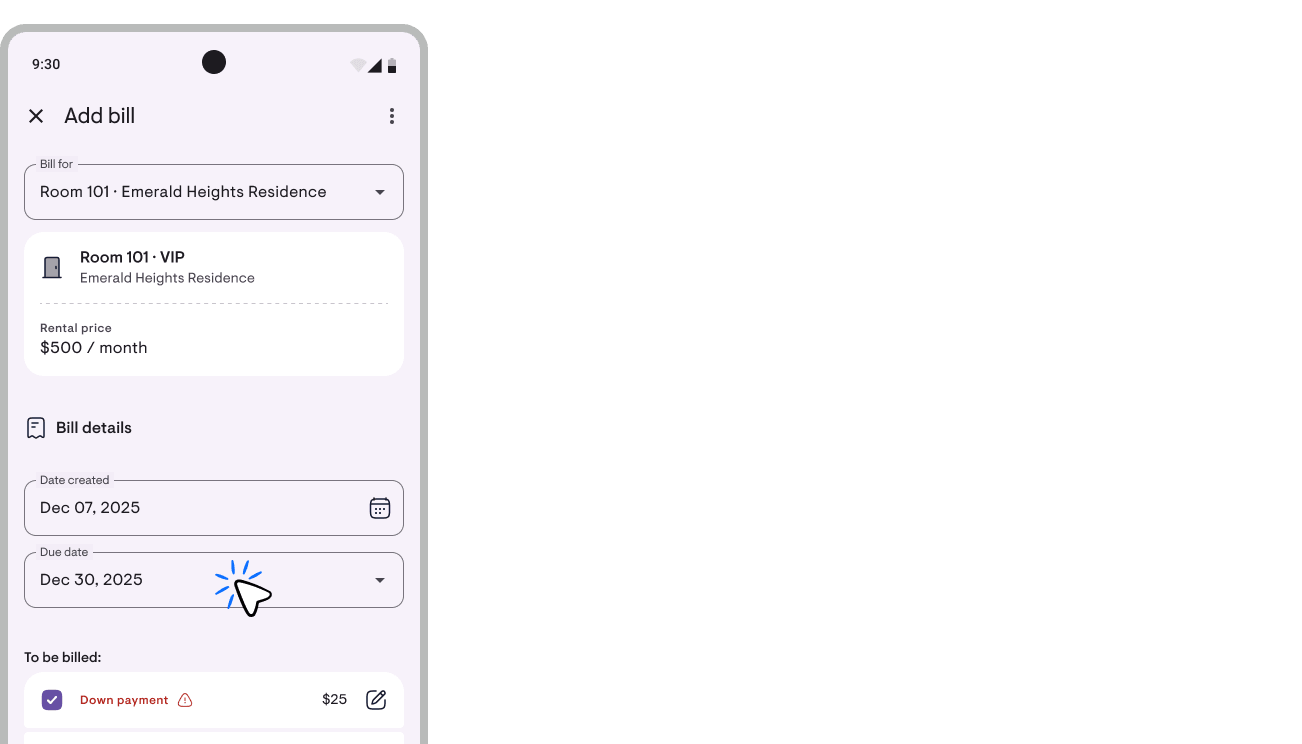
2. Invoice due date control. Preset in Add/Edit Invoice: Rent period start (default), 1, 3, 7, 15, or 30 days. Each option shows the actual resolved date that will be used. For DP/booking invoices, the default now anchors to check-in. Plus an automatic payment note in the PDF (Simple + Professional).
3. Document display settings. Profile → Settings → Document template, 7 switches for what shows on Invoice/Receipt/deposit return (logo, address, phone, email, check-in/out, remaining period). “See example” button for an instant preview. Free.
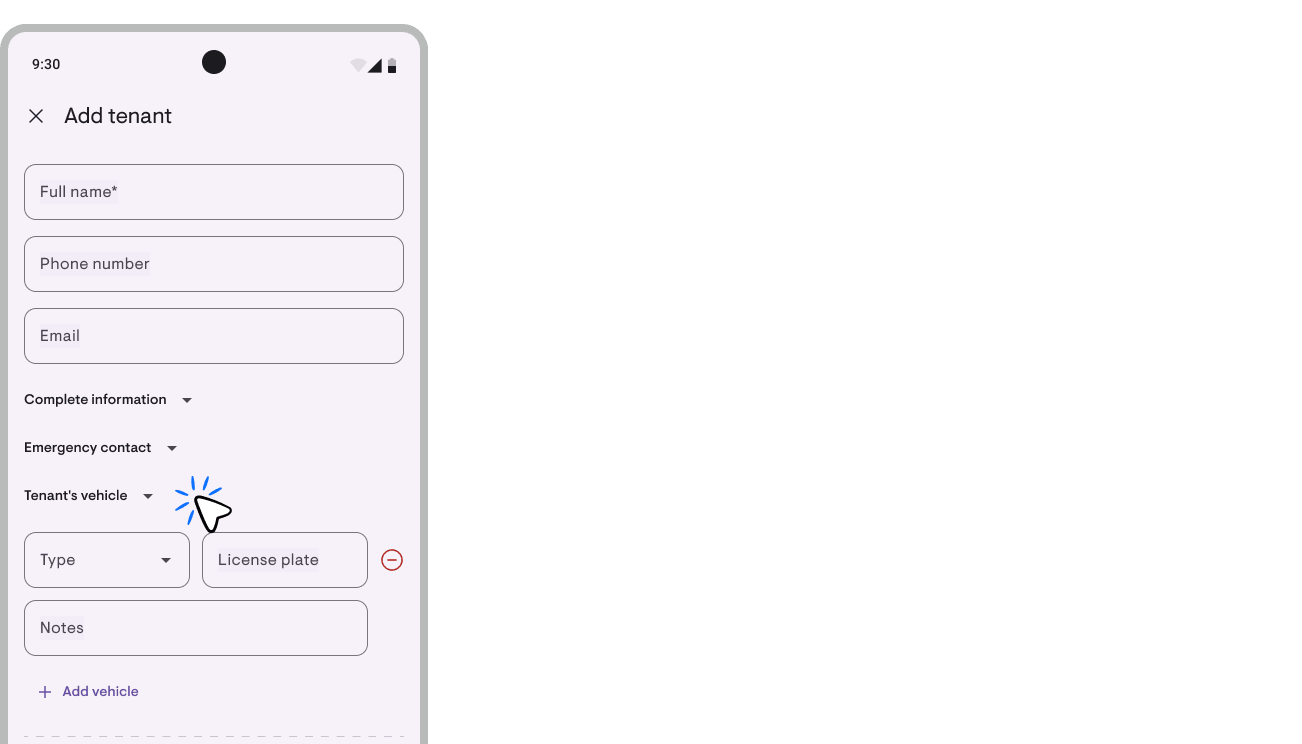
4. Note per tenant vehicle. Each vehicle entry now carries a Note field (250 chars), for colour, whose it is, which parking slot.
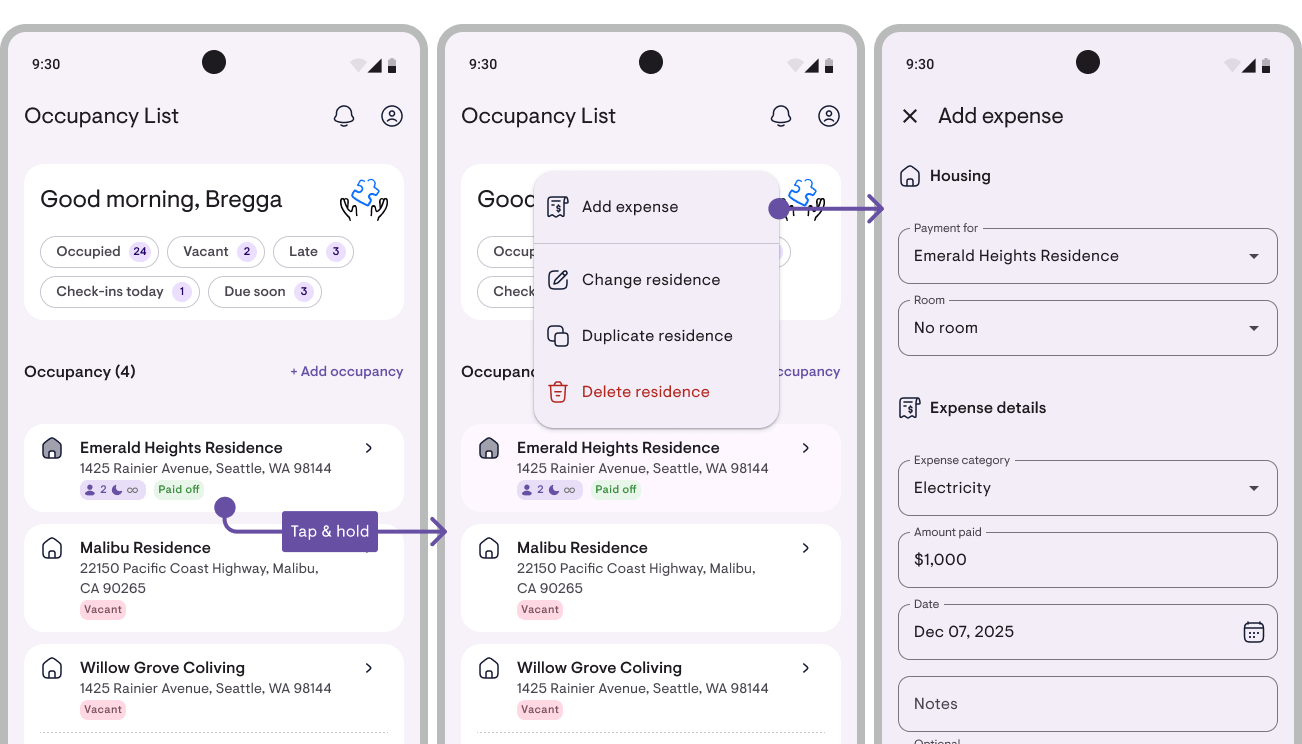
5. “Add expense” shortcut from the property/room card. Long-press a card → menu → Add expense. Long-pressing a room card pre-fills the room.
Fixes worth mentioning
- “Booked” now shows for every upcoming tenant, not just DP-paid ones.
- Arrears report agrees with the room badge, no more “room Late, Arrears Rp 0” mismatch.
- Cash-basis income includes prepaid periods. If your tenants often prepay, that month’s income will read higher than before.
- Editing an Invoice no longer silently rewrites the due date.
And plenty of other small fixes that make Kamaru better.
The people building this app are all of you ❤️
Three main features in this update, Payment status on the Calendar, Prevent double booking, and Occupant roster, all came from landlord requests. Take one example: payment status colours on the calendar. It came from one WhatsApp message from a landlord in Maluku, 14 June 2026. He asked for a red marker for late periods. We thought “why not do all four statuses?”, and that’s the feature you now see on your calendar.
This isn’t a special story. It’s the pattern we want more of: you speak, we listen, features appear. Kamaru is built by a small team without investors, we don’t have a UX research department, so you’re the one who knows what’s missing.
Two ways we build Kamaru together:
- Profile → Feature request, straight from the app, straight to our inbox. We’ll continue the conversation via WhatsApp or Email.
- Review on the store, 20 seconds, but a good review = higher ranking = more owners discovering Kamaru → more feedback = more features that people actually use.
So if there’s one thing that makes your life harder in this app, please tell us. The next update might have your idea in it.
, Bregga / founder of Kamaru
Additional charges & Discounts! Plus 3 other updates
v1.8.0
v1.8.0 brings two of the most-requested features: Additional charges and Discounts. Rent is no longer just about the room price — electricity, water, internet, and laundry can all be billed cleanly, and you can offer discounts to tenants without making the numbers messy.
Additional charges: bill electricity, water, internet, and more
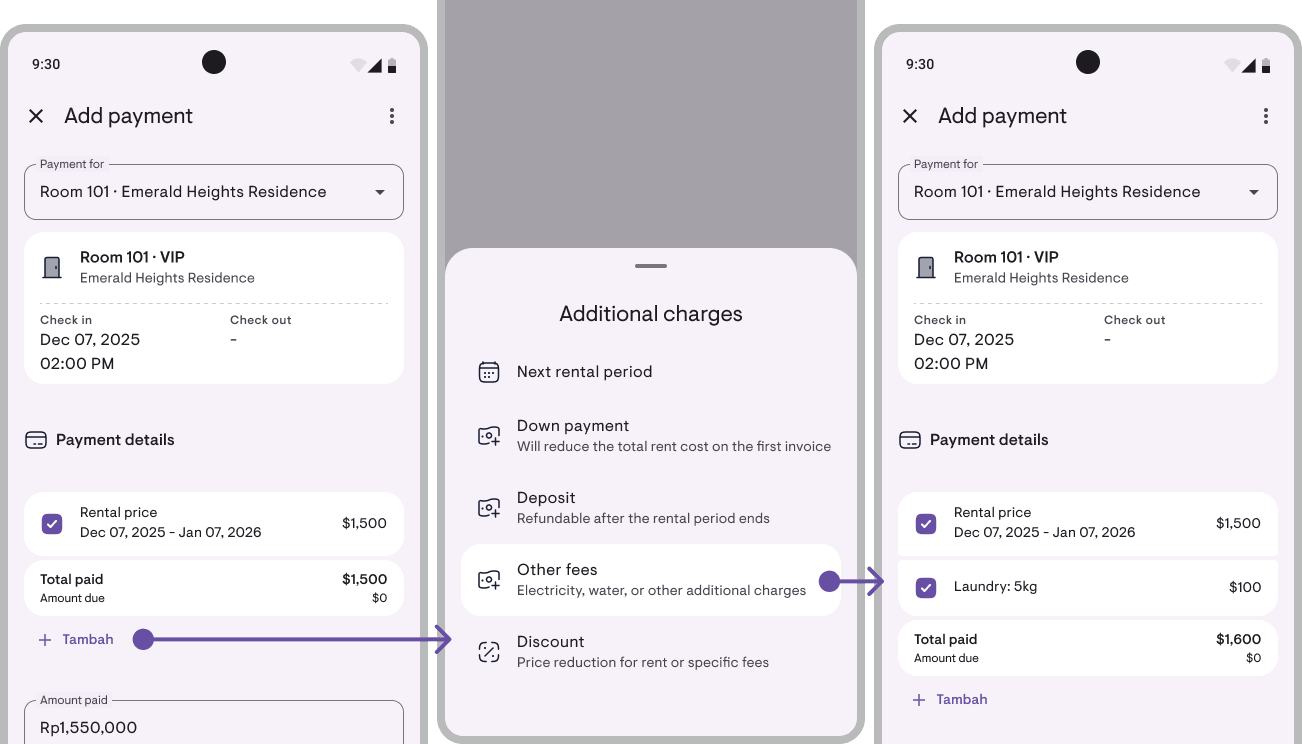
For a long time, many of you have been billing electricity or water through separate notes. Now all of that becomes an official part of the rent.
Each tenant can have recurring charges (billed each period — e.g. Electricity Rp 100k/month) or one-time charges (single period only — e.g. Extra bed). You’re free to change the rate going forward, or override it for just one period.
In the Lease detail, each charge appears as its own line with its own paid status — so it’s clear which ones are paid and which aren’t. Additional charges also automatically flow into Record payment, can be included in formal Invoices, and are tracked per category in the financial report (Electricity, Water, Laundry — each read separately from rent).
Tenant not using the service for a particular month? Tap the charge in the Lease detail and pick Remove this period only — the charge is skipped for that one period, and the next period continues as normal. If the service stops for good, pick Remove permanently — the charge stops from your chosen period forward (past periods stay intact in your records).
Additional charges is a Pro feature. Existing data stays editable and deletable even if you switch back to the free plan.
Discounts: give a break, stay transparent
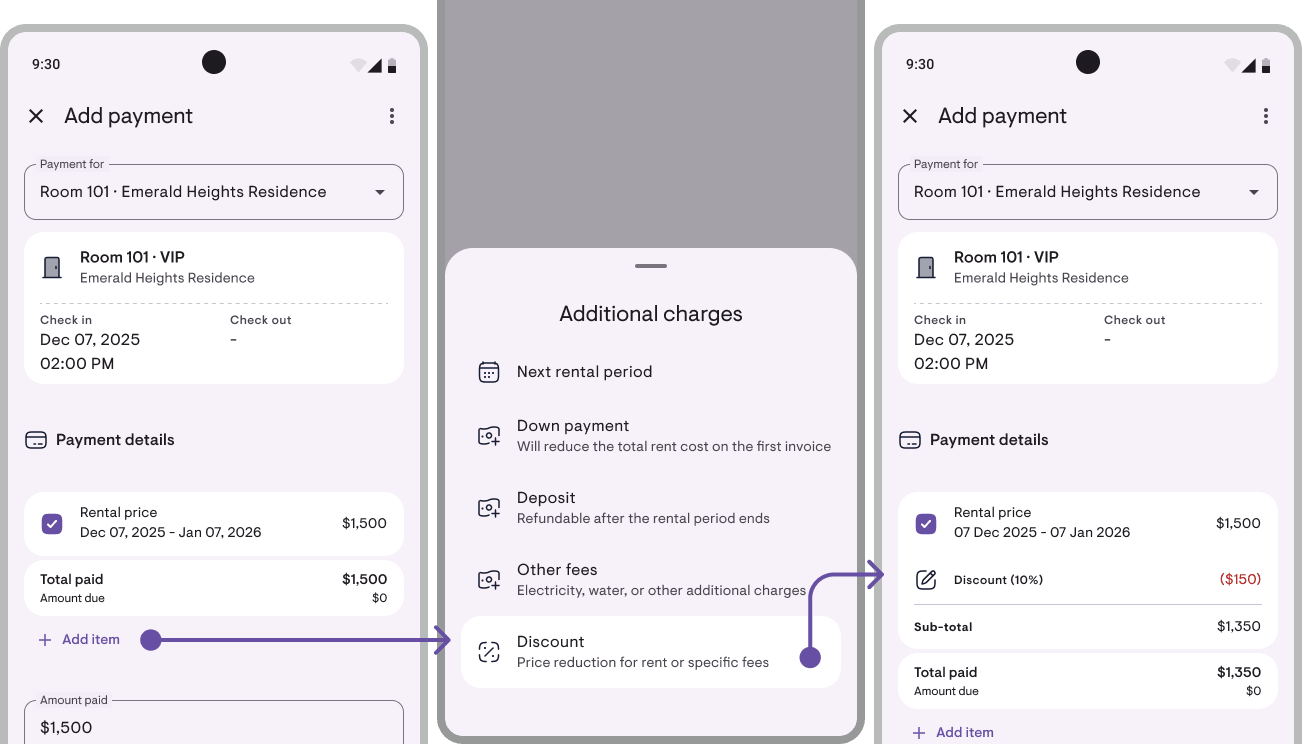
Often give special pricing — yearly commitment, holiday promo, or per-tenant negotiation? Now there’s Discounts.
Give a discount as a fixed amount (Rp) or a percentage (%) on rent or on additional charges. What’s different: the original price still shows in full on the receipt, the discount appears as its own line, and only then comes the final total — so the tenant can see the math for themselves. No numbers “quietly” changing.
Using the same discount often? Save it as a favorite discount — next time just pick from the list, no need to retype.
Discounts is free for everyone. We deliberately didn’t gate this behind Pro — because this is about your transparency to tenants, and that matters for every owner.
Plus 3 other updates
1. Multiple rent price options per property/room. One room can have more than one price — e.g. Rp 500k/day, Rp 1M/week, Rp 1.5M/month. When you add a tenant, just pick the one that fits.
2. Cleaner invoices & receipts. When a single invoice covers several consecutive rent periods, they’re now automatically merged into one concise line — no more long list of repeating rows.
3. Export reports to Excel. Financial Report, Cash Flow, and Balance Sheet can now be exported to .xlsx — on top of the existing PDF and CSV.
A small ad~
Kamaru is built by a small, self-funded team with no investors. If this update helps you, one thing that really helps us back: leave a rating.
Takes just 20 seconds — tap Rate Kamaru on your profile page.
Thank you to everyone who’s already rated us, you’re the real MVPs!
— Bregga / founder of Kamaru
Per-period rent price changes and 4 more updates
v1.7.4
This update bundles v1.7.3 + v1.7.4 — the main focus is per-period rent price control, plus 4 more updates that improve how you communicate with tenants and read your reports.
Per-period rent price changes
You can now change rent prices with per-period precision — the new price only applies to the period you choose, and your payment history and past period reports stay intact.
A. Apply from a specific period onward
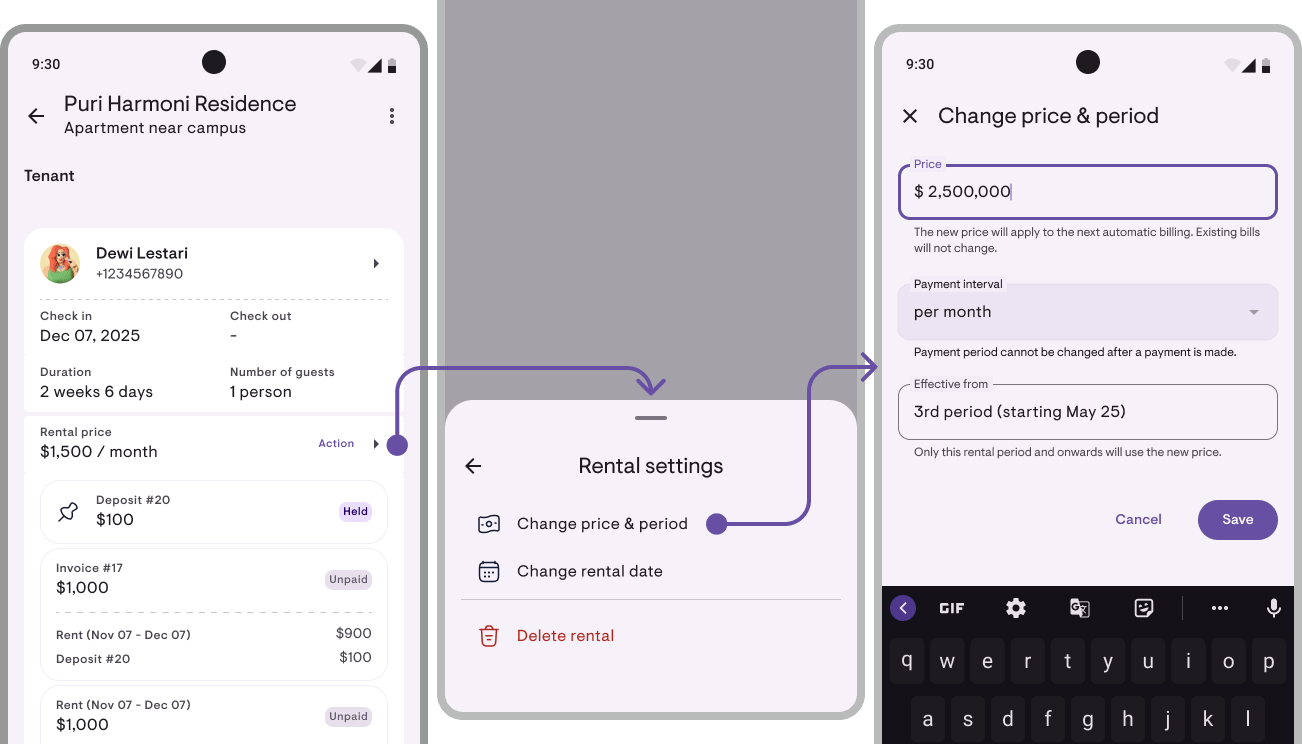
Open Actions → Change rent & period → enter the new amount + select “Apply from period N” in the dropdown. Defaults to the current period. Good for annual rent increases or cost adjustments.
B. Override just one period
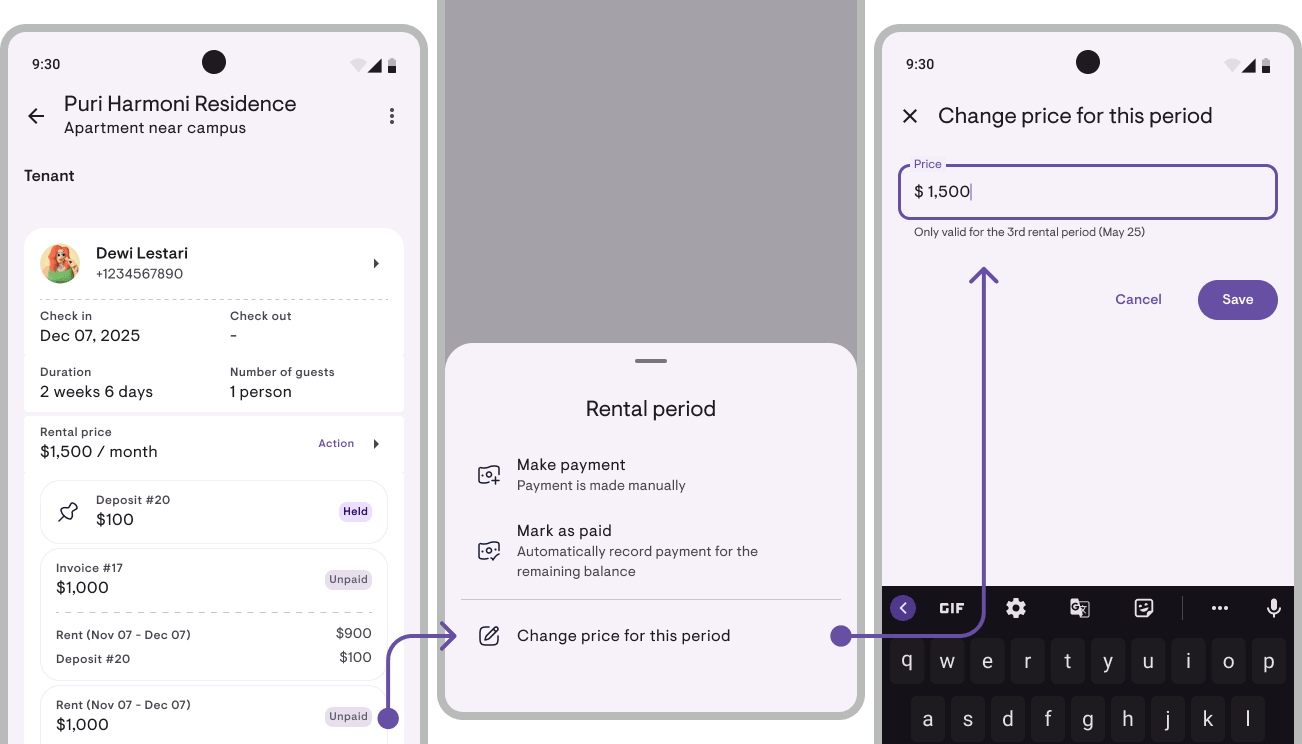
Tap a Rent period row on the obligation card → Change this period’s price. Good for a one-month Eid discount or specific compensation without affecting other periods.
Periods that already have payments are auto-locked — menu disabled, field read-only, save guard re-checks on Save. Your existing payment records stay accurate.
Notes for tenants on receipts
When recording a payment, you now get two separate notes fields: Notes for tenant (printed on the receipt PDF you share) and Internal notes (only you see them).
Notes for tenants work well for thank-you messages or context. Internal notes work for your own reminders. They appear in Record payment, Edit payment, and Add Tenant — both optional, max 200 chars, multiline.
Short descriptions for properties & rooms
Each property and room can carry a short description (max 100 chars) you can optionally print on PDF documents — e.g. “Female boarding house near campus” on a property, “AC, ensuite bathroom” on a room.
Tick “Show description on documents like receipts” → it appears on payment receipts, invoices, and deposit refund proofs. Off → it only serves as a subtitle in the detail screen’s app bar — internal only.
Per-property phone number
Each property can now carry its own contact phone — useful when you have different managers per location or want to separate business numbers from personal.
Set it up in Add/Edit Property step 2 (master toggle + a “Same as registered account phone” option). The number shows up on PDF documents (receipts, invoices, deposit proofs), in the WhatsApp invoice message, and on the property profile. Change your account phone in Profile → every property still set to “same as account” auto-syncs.
Accrual mode in financial reports
The Dashboard + Financial Report now have a Cash / Accrual toggle in the filter row.
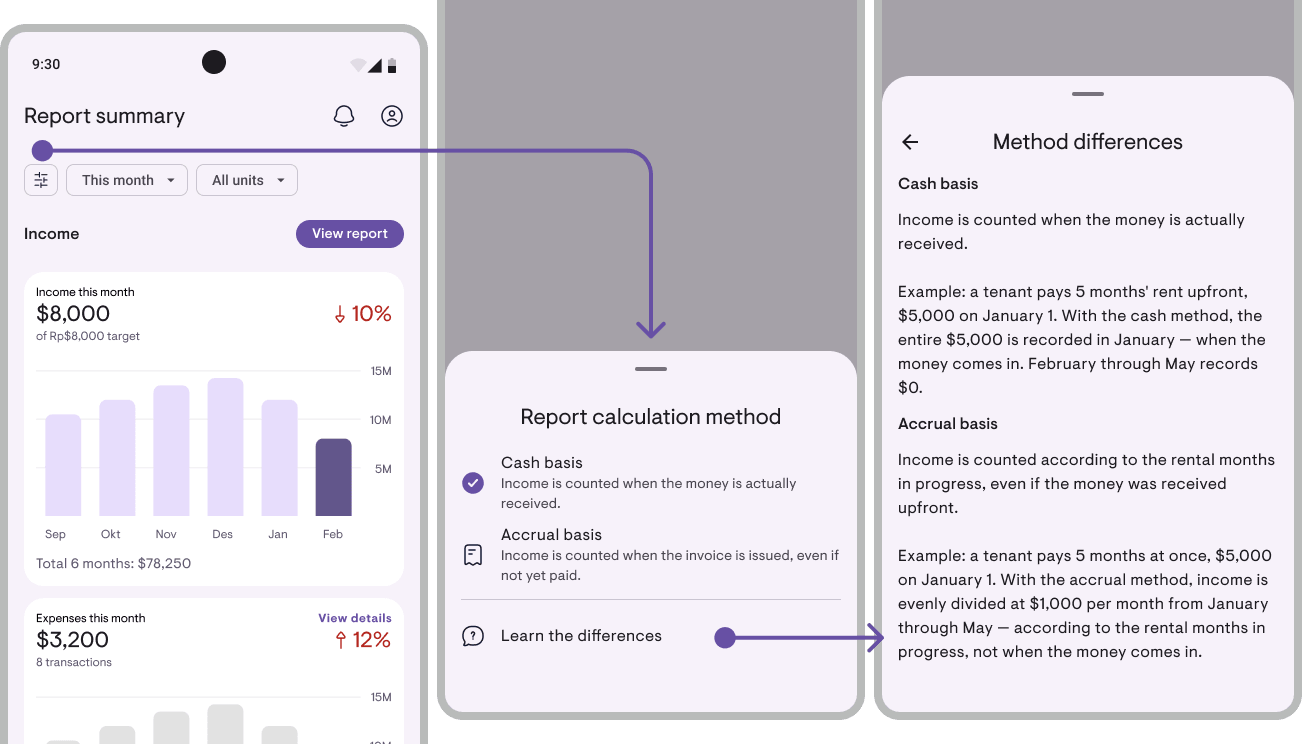
- Cash (default) — income counted when money actually arrives
- Accrual — income counted as it’s earned, over the rental period
Example: a tenant pays 6 months upfront in January. Cash mode → January spikes at $6,000, February–June at $0. Accrual mode → each month evenly counts $1,000 across the stay. Good for month-to-month comparisons (apple-to-apple) or understanding what’s truly “earned” per month regardless of when it was paid.
What follows the toggle: dashboard income + Financial Report. What stays cash-pinned: Cash Flow, Balance Sheet, Transaction History. An “Accounting method differences” explainer is available via the (i) icon in the report header.
A small ad~
Kamaru is built by a small team, self-funded, no investors. We’re competing against big apps with much bigger marketing budgets. One thing that really helps us: leave a rating.
It only takes 20 seconds. Seriously, we timed it. And we’ll remember you fondly for the rest of the week.
You can now rate us directly from within the app — tap Rate Kamaru on your profile page.
Thanks to everyone who’s already left a rating — you’re the real MVP!
— Bregga / founder Kamaru
New Invoice system! Plus deposits, down payments, and 8 more updates
v1.7.0
v1.7.0 introduces new systems for Invoices, Deposits, and Down payments — plus 8 more updates.
Invoices: formal documents for your tenants
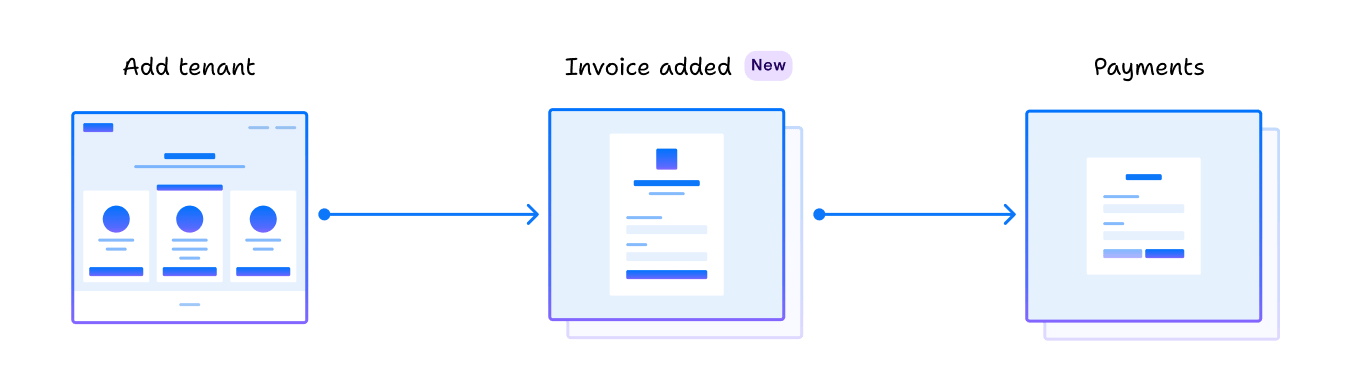
New tab in tenant details. You can now create formal invoices whenever you need them — to send to a tenant, attach for tax filing, or keep for your records. Your primary records still live in lease + payments; invoices sit on top as documents.
What’s new:
- Record payments directly from the lease. No need to create an invoice first. Enter the amount + date, and the system handles the allocation.
- Payments auto-cascade. Each payment splits automatically: DP first until covered → Deposit until covered → the rest to Rent. Reports stay accurate per category.
- Formal invoices on demand.
+ Invoiceon the tenant’s Invoices tab: pick items (Rent for period X / Down payment / Deposit / Extra), save, share. For formal documents, not every month. - Smart mark-as-paid. Calculates the actual remaining balance, including any existing payments from before this update.
- “Invoices” tab in the tenant detail: all formal invoices you’ve created, with real-time status (Unpaid / Partial / Paid / Overdue).
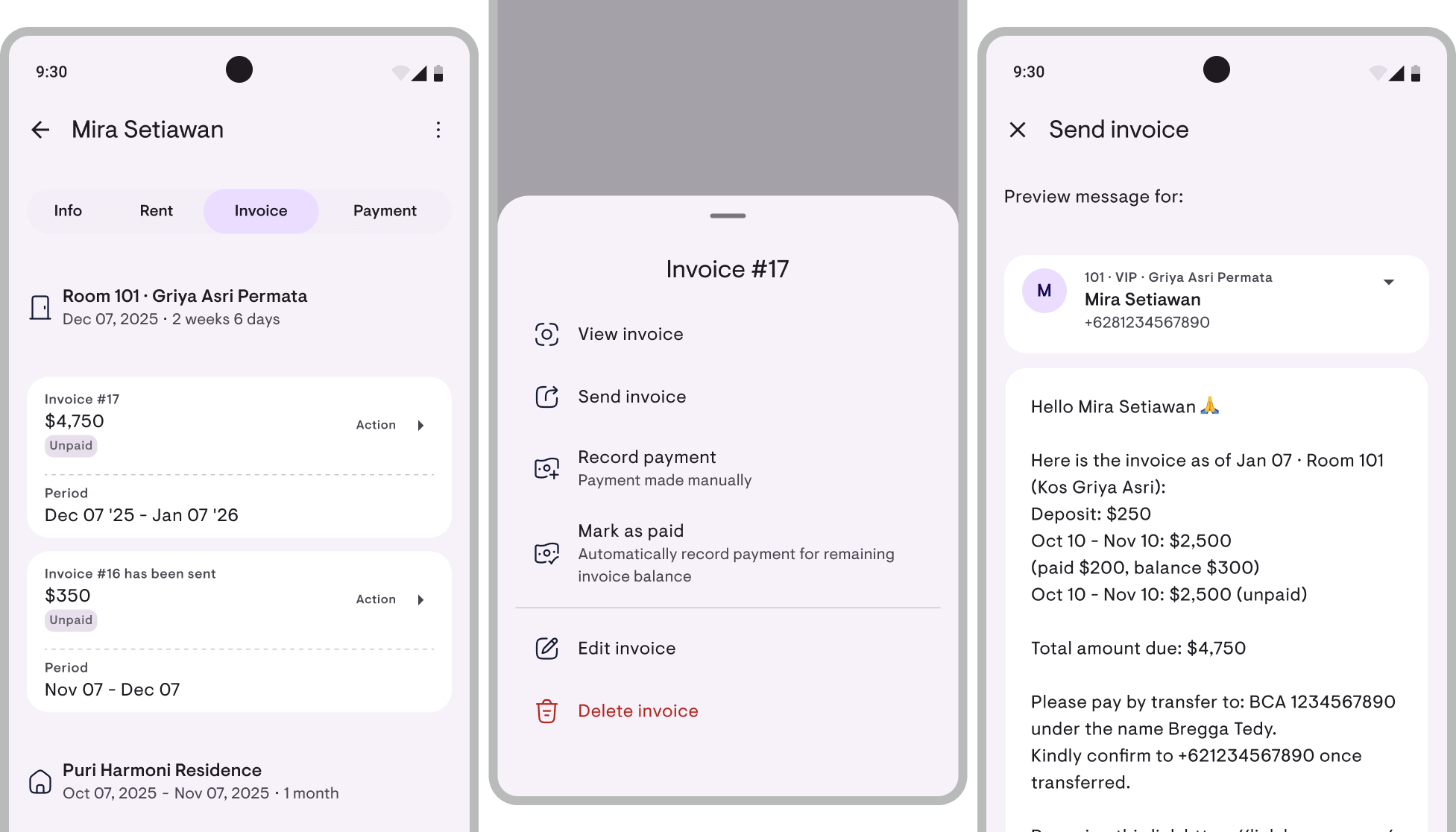
Send invoices via WhatsApp or email
Actions › Send invoice → message auto-prepared from a template. Share to WhatsApp (opens chat to the tenant’s number with the text pre-filled), Email, Copy, or Others. Plus every invoice can be exported as a formal PDF to attach separately.
Deposits: handled as a liability (held funds)
Proper accounting treatment. Plenty of owners panic when a tenant checks out and asks for their deposit back — the root cause: deposits easily get mixed with income. Kamaru now handles the deposit cycle with the right category:
- Receive deposit → recorded as “Deposit held” (a liability), not income.
- At checkout, deduct for damages or unpaid rent — each deduction has an amount + note + date. The deducted portion becomes income at that point.
- Refund the remainder → recorded as cash out.
- Deduction proof PDF can be shared directly with the tenant.
The effect is real: the profit you see in your reports is actual profit (not inflated by deposits you’ll eventually have to return), and the Balance Sheet shows exactly how much you’re holding.
Down payments: a separate obligation on the lease
DP has its own place now. Down payments (DP) are now a separate obligation on the lease — no longer folded into regular rent payments.
- Dedicated “Down payment” section when adding a tenant — enter the DP directly on the lease, no need to calculate it as part of the first month’s rent.
- Payments auto-allocate to DP first. When the tenant pays, the system fills the DP obligation before Deposit/Rent — no more miscategorized payments.
- In reports, DPs stand alone — the Cash Flow report shows “Down payment” as a cash source distinct from “Rent”.
- When you create a formal invoice, DP gets its own line (not mixed with rent).
The result: three concepts that often get tangled in manual records — rent, DP, and deposit — now each stand on their own.
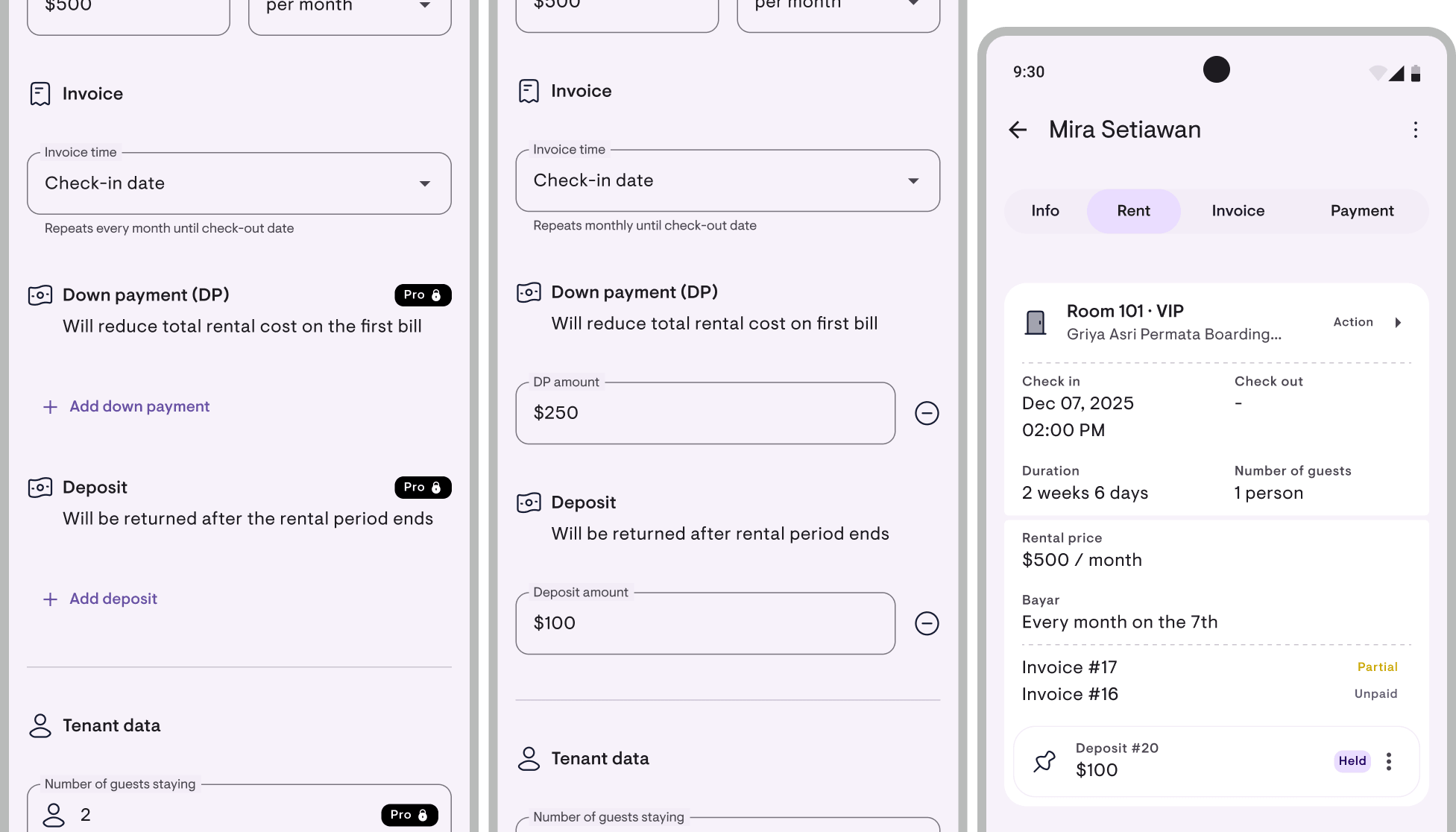
Financial reports: rebuilt too
With Invoices and Deposits restructured at the foundation, the reports dashboard changed too: 3 separate reports + Transaction History + custom date range filter.
Financial Report
P&L-style: target revenue, collected, outstanding, collection rate, expenses by category, net income, occupancy, per-property breakdown. Plus two new sections:
- AR aging — buckets: not yet due / 0–30 / 31–60 / 61–90 / 90+ days. Finally know who’s been overdue the longest.
- Liabilities (Deposit held) — appears when there’s an active deposit (derived from the Deposit change above).
Cash Flow Report
New report. Specifically for tracking money in and out:
- Cash in by source: Rent / Down payment / Extra / Deposit deductions / Deposit held
- Cash out by expense category + Deposit refunds
- Net cash computed automatically
- Filter by type, month, property
Good for reconciling against your bank statements.
Balance Sheet (Financial Position)
Another new report. A snapshot of where you stand today — total deposits you’re holding, with breakdown per tenant.
Transaction History
New screen. A flat list of all transactions without summaries, with filters for type / period / property. Good for line-by-line cross-checks or audits.
Custom date range filter
Beyond “This month” / “1 year”, you can now pick a custom date range (e.g. March 15 – April 14). Useful for accounting cycles that don’t line up with calendar months.
Full export
Everything can be exported to PDF (A4) or CSV (Excel / Sheets).
These reports are Pro features. Free users see a preview with sample data.
Small improvements that help
- Quarterly invoices (3-month period) — payment periods are now complete: daily, weekly, biweekly, monthly, quarterly, 6-monthly, yearly.
- Property logo on PDF documents — upload your property logo once, and it shows up automatically on invoices, receipts, and deposit refund proofs.
- Export occupancy calendar to PDF — Gantt-style per month or year, with a toggle for tenant names.
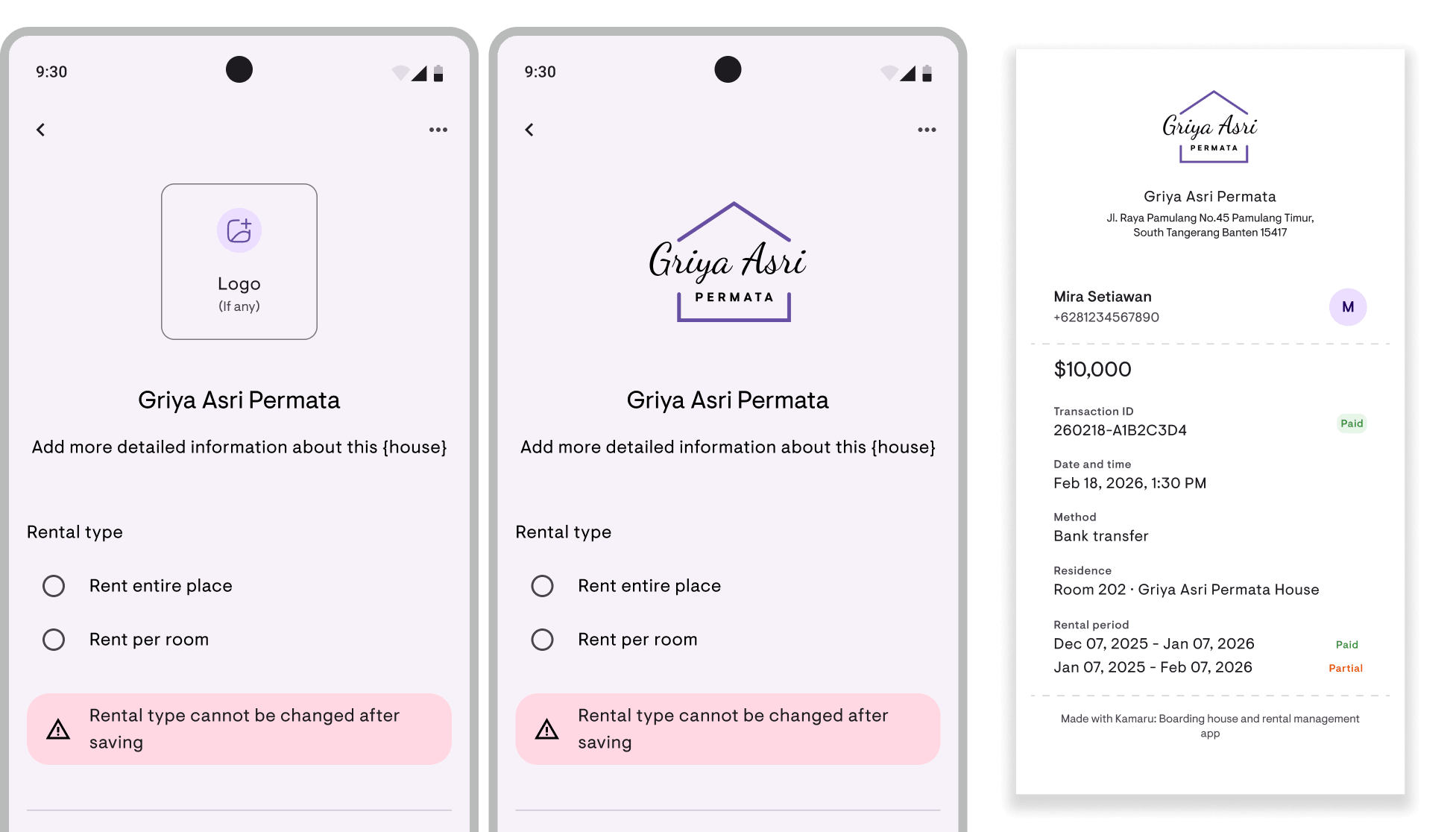
Under the hood
- iOS is now full Swift Package Manager (CocoaPods removed entirely). Faster builds, cleaner dependencies.
- Image compression rebuilt with the pure-Dart
imagepackage. Lighter, with correct output dimensions. - Plus hundreds of small polishes — from the
AddPaymentScreenlayout, to room number sorting that’s now natural (101<102, not the old lexical order).
A small ad~
Kamaru is built by a small team, self-funded, no investors. We’re competing against big apps with much bigger marketing budgets. One thing that really helps us: leave a rating.
It only takes 20 seconds. Seriously, we timed it. And we’ll remember you fondly for the rest of the week.
You can now rate us directly from within the app — tap Rate Kamaru on your profile page.
Thanks to everyone who’s already left a rating — you’re the real MVP!
— Bregga / founder Kamaru
Big update: 5 properties on the free plan! Calendar now does weekly & monthly!
v1.6.1
Two big changes you’ve been asking for, plus a handful of behind-the-scenes improvements.
The headlines:
- Kamaru’s free plan now covers 5 properties — up from 2.
- The occupancy calendar now has 3 view modes: Daily, Weekly, Monthly.
Let’s get into it.
Free plan now covers 5 properties
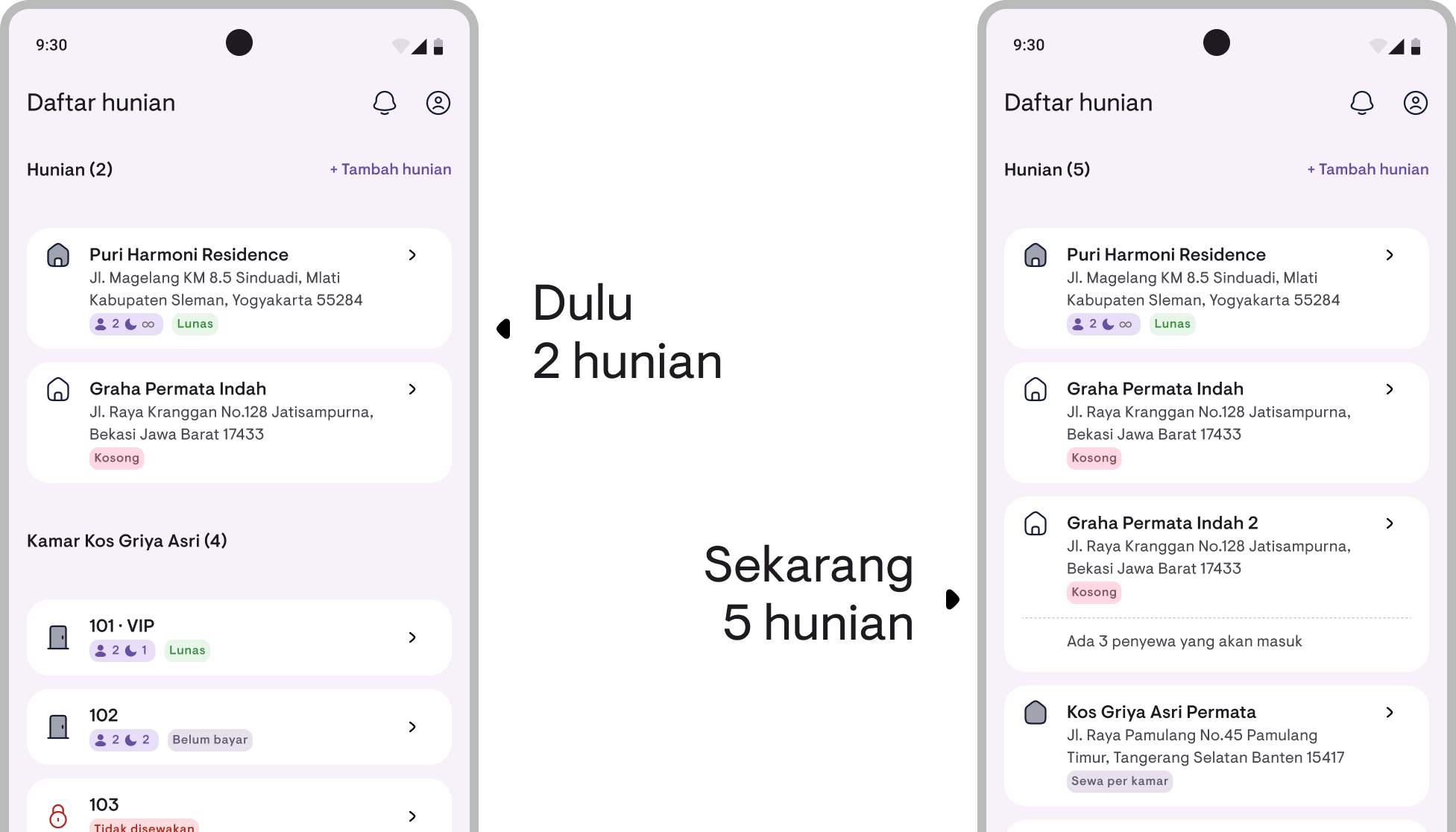
Before, the free plan only fit 2 properties. Now, 5.
Why the bump? Because “property” means different things depending on what you’re renting out. A kos (boarding house) owner usually has many rooms inside a single property — 2 was usually enough to start. But for kontrakan (rental homes) and villa owners, each unit is its own property. Anyone with 3 villas or 4 kontrakan units would hit the free-plan ceiling immediately, just because of how it’s counted.
Kamaru isn’t just for kos. Kontrakan, villa, mixed-use — they all deserve enough room to take a real test drive before deciding to upgrade.
Here’s how it works now:
- 1–5 properties — free forever
- More than 5 properties — Pro (which still gets you financial reports, expense tracking, PDF exports, and priority support)
If you already have 3, 4, or 5 properties and got locked out before — once you update, they all unlock. Nothing to configure, just works.
Calendar: Daily, Weekly, Monthly
The occupancy calendar used to have just one mode: 1 column = 1 day. Great for day-use, short stays, or airbnb. But if you rent out yearly leases, you’d need to scroll forever to see one from start to finish — or to answer “from May to August, which rooms are booked?”
Now there’s a new view-mode button in the calendar’s filter bar. Pick one of three:
- Daily — 1 column = 1 day. The default. Best for day-use, weekly stays, or airbnb.
- Weekly — 1 column = 1 week (anchored to Monday). Fits 2–3 months on screen — ideal for monthly rentals.
- Monthly — 1 column = 1 month. For yearly or multi-year leases, see your entire portfolio end-to-end.
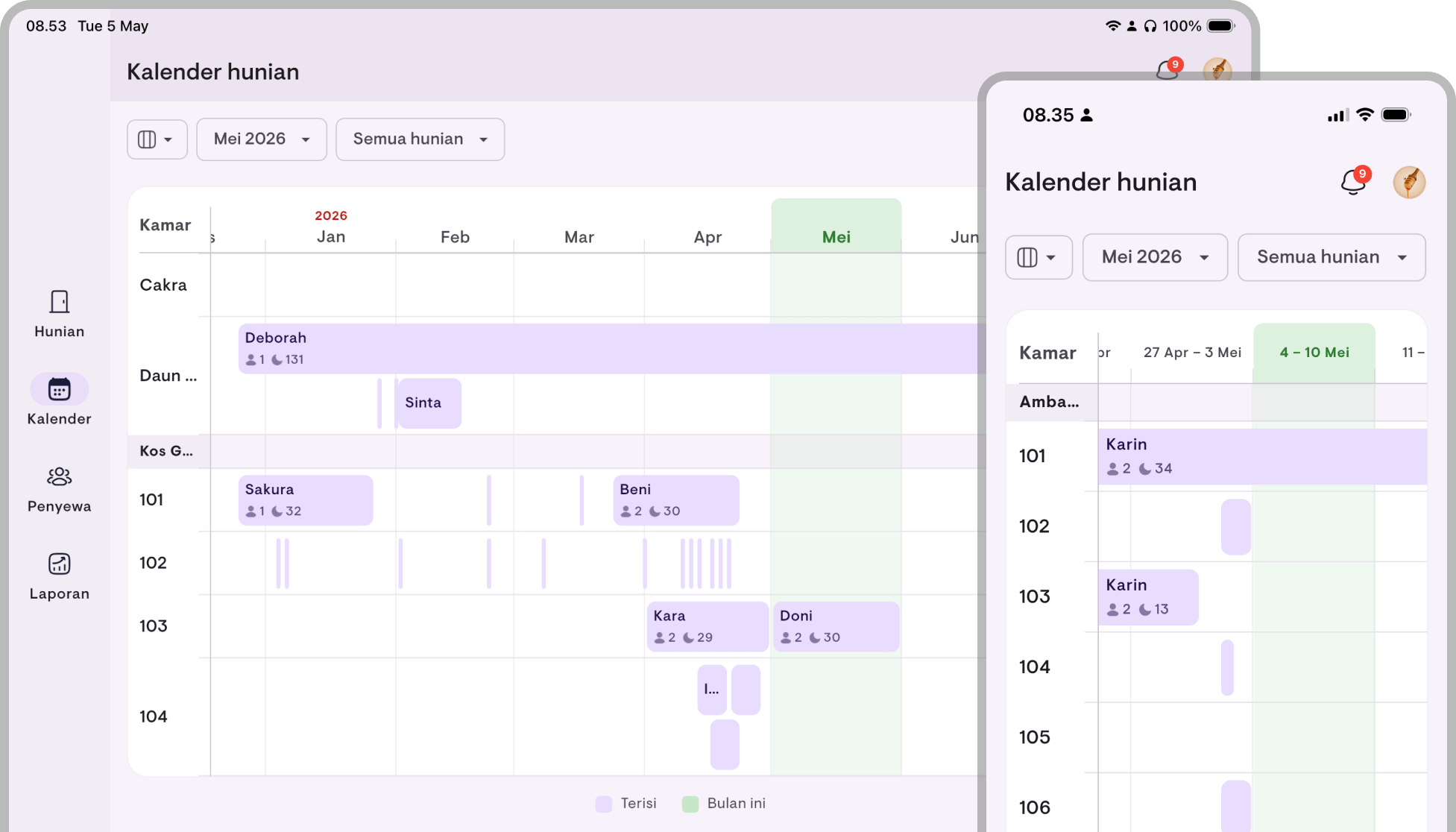
What I love most: lease bars stay proportional to actual dates. Whatever mode you’re in, the bar’s length tells the real duration — a 6-month lease is twice as long as a 3-month one. Tap-to-add-lease also snaps to the period: Weekly mode lands on the Monday of that week, Monthly on day 1 of that month.
Your chosen mode is remembered too — it doesn’t reset to the default every time you open the app.
Bonus: scrolling is way smoother
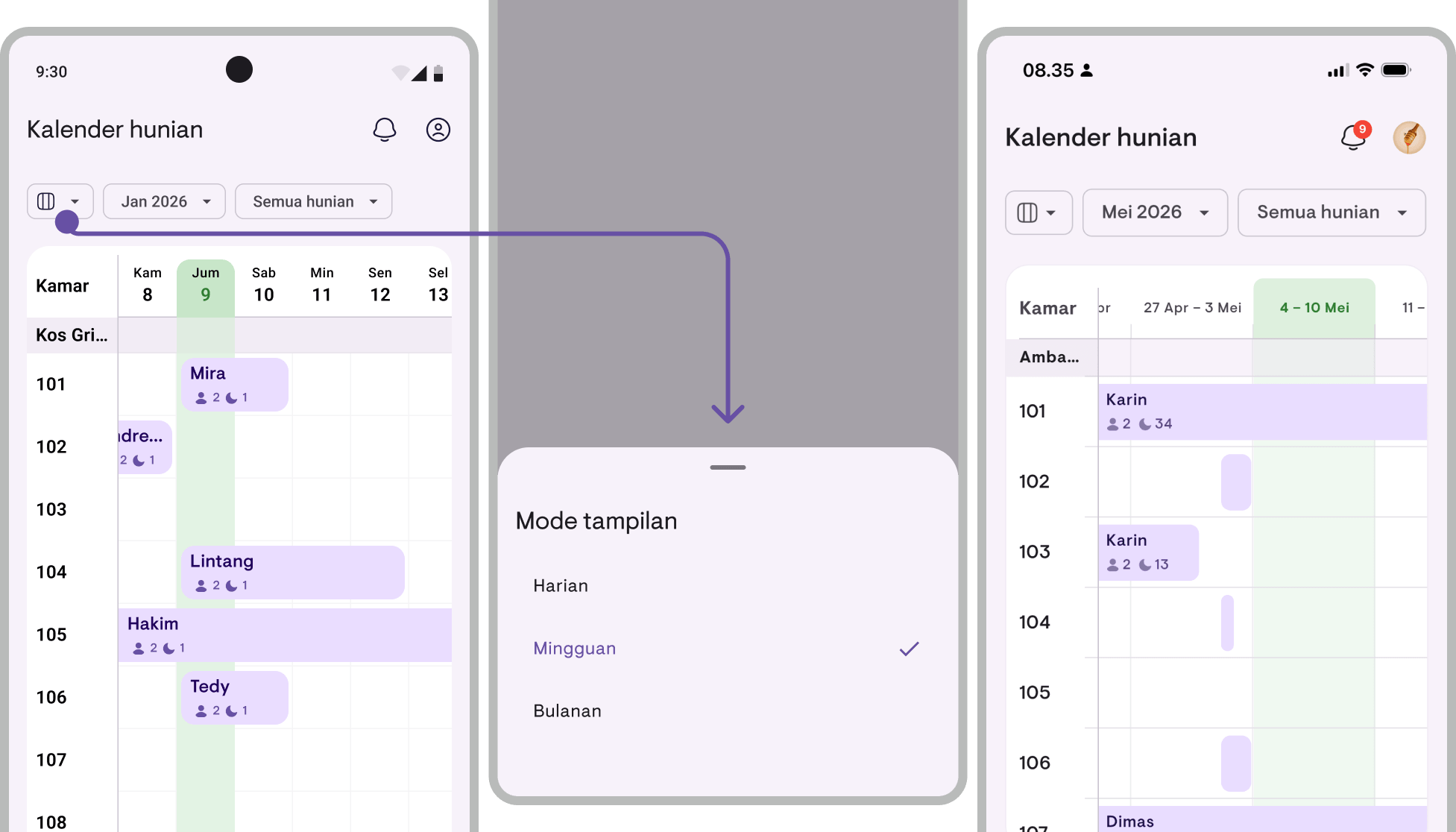
If you own properties with lots of rooms, the calendar used to feel a bit laggy when scrolling. I rebuilt how rows render from scratch — now scrolling is smooth, animations don’t stutter, and tap-to-add still responds instantly. Daily mode benefits the most.
What else?
A few smaller things you’ve asked about:
- Offline indicator — A small strip at the bottom of the screen pops up when your internet drops, and confirms when you’re back online. Your first action after reconnecting won’t hang on a stale auth token.
- Upcoming tenants on property and room cards — Vacant units with future bookings now show “N upcoming tenants” so you don’t miss who’s about to check in.
- Day-use — For same-day rentals like daytime villas or hourly hotels, you can now record check-in at 14:00 and check-out at 20:00 on the same date. The calendar automatically tags those bars as “Day-use”.
- Per-period payment status — Once a tenant pays month 1 in full, the lease shows “Paid” for that period. When month 2 begins, it automatically flips back to “Unpaid”. No manual reset. Payment receipts still show the status at the time of the transaction.
- Late status can be turned off — If you don’t mind a tenant being a day or two late and don’t want notifications about it, go to Settings → Finance → Late status and switch it off. Leases won’t flip to “Late” anymore, and the related notifications stop.
- Region setting in your profile, alongside the language setting. For users running the app outside its default country, you can now set this manually.
Plus a lot of bug fixes and small polish — especially around iPad and Android cold start.
A small ad~
Kamaru is built by a small team, self-funded, no investors. We’re competing against big apps with much bigger marketing budgets. One thing that really helps us: leave a rating.
It only takes 20 seconds. Seriously, we timed it. And we’ll remember you fondly for the rest of the week.
You can now rate us directly from within the app — tap Rate Kamaru on your profile page.
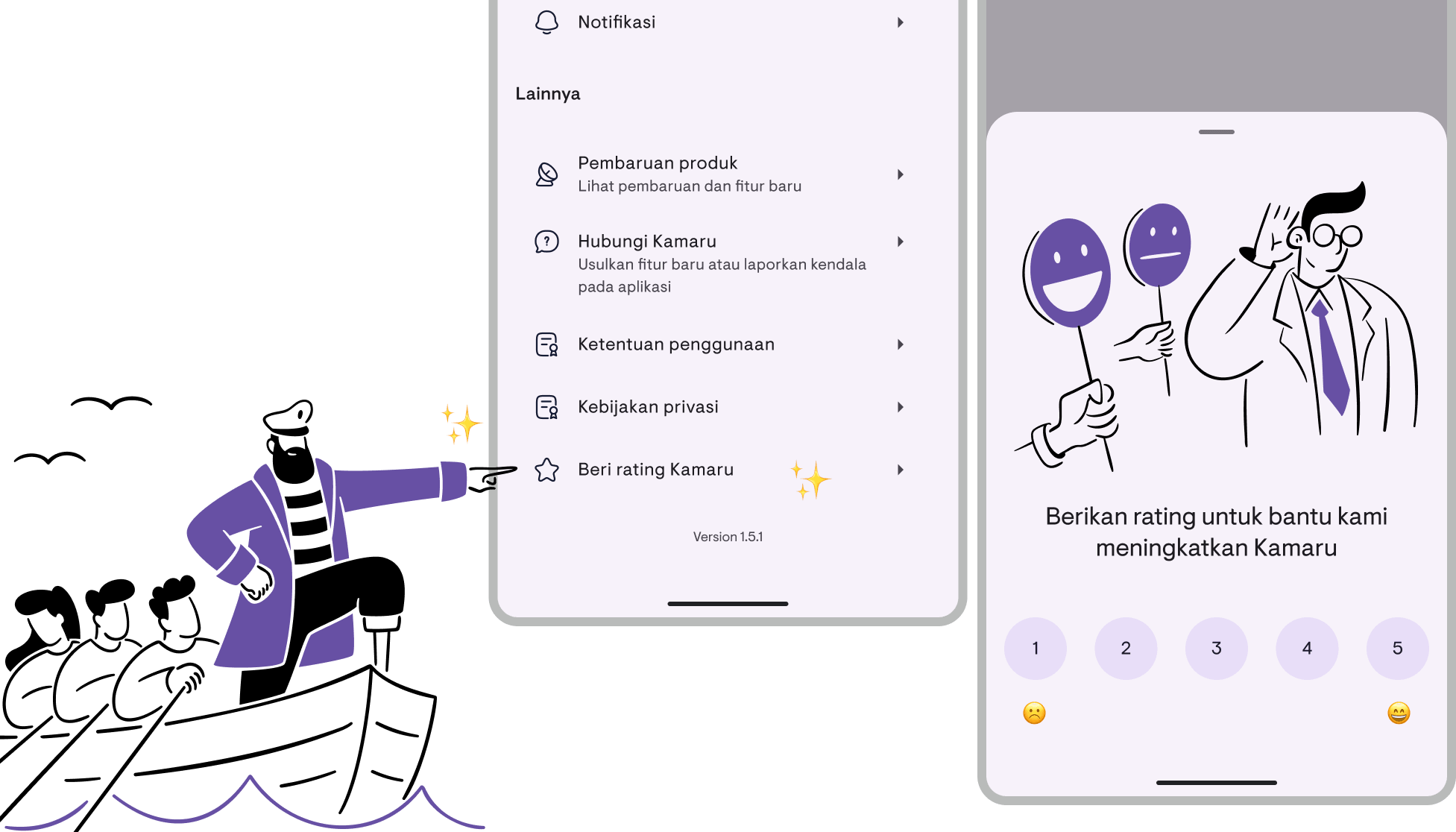
Thanks to everyone who’s already left a rating — you’re awesome!
— Bregga / founder Kamaru
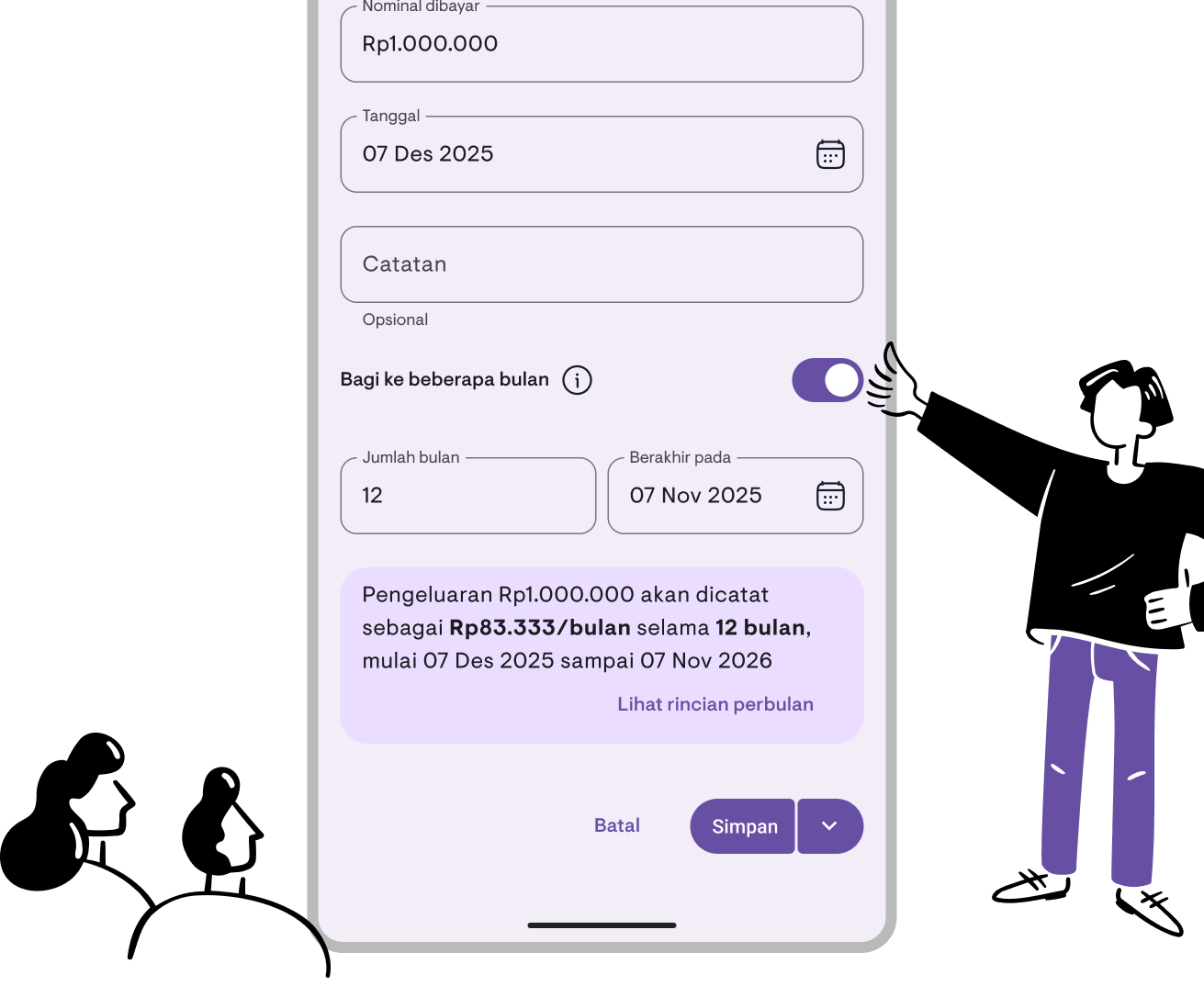
Split expenses across multiple months
This feature was requested directly by Kamaru users. Some of you told us: “I pay for Wi-Fi annually, but it only shows up in one month’s report. Can it be split evenly?”
Absolutely. We listened, and now it’s here.
Pay $1,200 for annual Wi-Fi in January. That month’s report spikes, while the rest show zero. But in reality, you’re using that Wi-Fi every single month.
Now, you can split expenses across multiple months — and your reports will finally reflect the real cost.
Have a feature idea or suggestion? Reach out to us — we read every piece of feedback.
What’s it good for?
- Annual Wi-Fi or internet
- Community or security fees
- Property insurance
- AC or elevator maintenance contracts
- Taxes paid in a lump sum
Basically, any expense that’s paid once but used over many months.
How it works
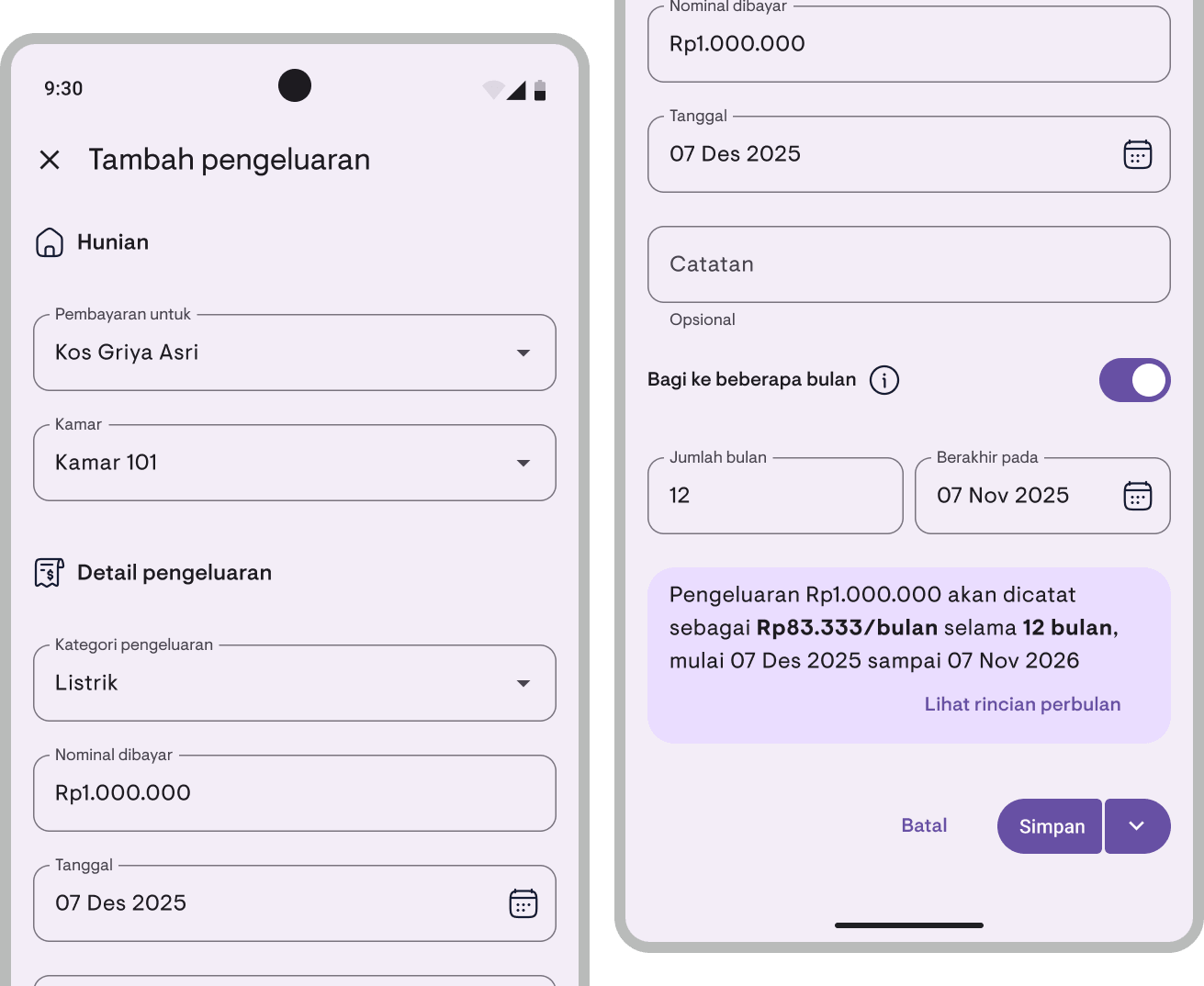
When recording an expense, just toggle on “Split into months”:
- Enter the total expense amount as usual
- Turn on the Split into months toggle
- Set the number of months (2–60 months 😱)
- Kamaru automatically splits it evenly across each month
For example: $1,200 split over 12 months = $100/month. Done. Your financial report now reflects the actual monthly cost.
Precise splitting
No need to worry about rounding. Kamaru handles it automatically:
- Zero-decimal currencies (IDR, JPY, etc.) — The rounding remainder goes to the first month. Example: Rp1,000,000 ÷ 12 = Rp83,337 + 11 × Rp83,333
- Decimal currencies (USD, EUR, etc.) — Same logic, total always exact
The total you entered always matches the sum of all installments exactly. No more, no less.
Preview the monthly breakdown
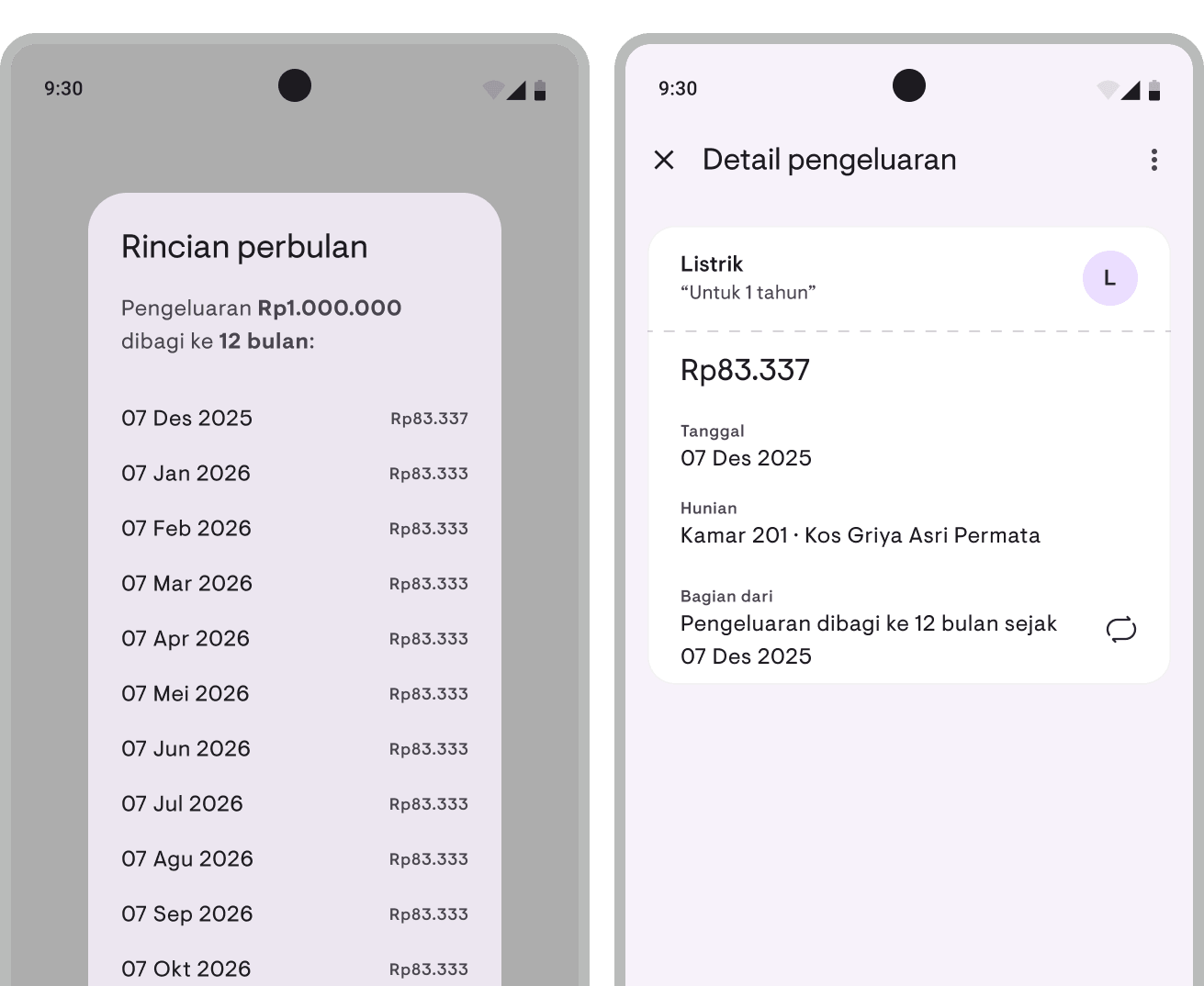
Before saving, you can view the full monthly breakdown — each installment’s date and amount. So you know exactly where your money is recorded.
More accurate reports
All installments show up as regular expenses in your financial and cash flow reports. Nothing changes about how you read reports — the data just becomes more accurate.
Amortized expenses are marked with a special icon, so you can still tell which ones are regular and which are split from a larger payment.
A small ad~
Kamaru is built by a small team, self-funded, no investors. We’re competing against big apps with much bigger marketing budgets. One thing that really helps us: leave a rating.
It only takes 20 seconds. Seriously, we timed it. And we’ll remember you fondly for the rest of the week.
You can now rate us directly from within the app — tap Rate Kamaru on your profile page.
Thanks to everyone who’s already left a rating — you’re the real MVP!
— Bregga / founder Kamaru
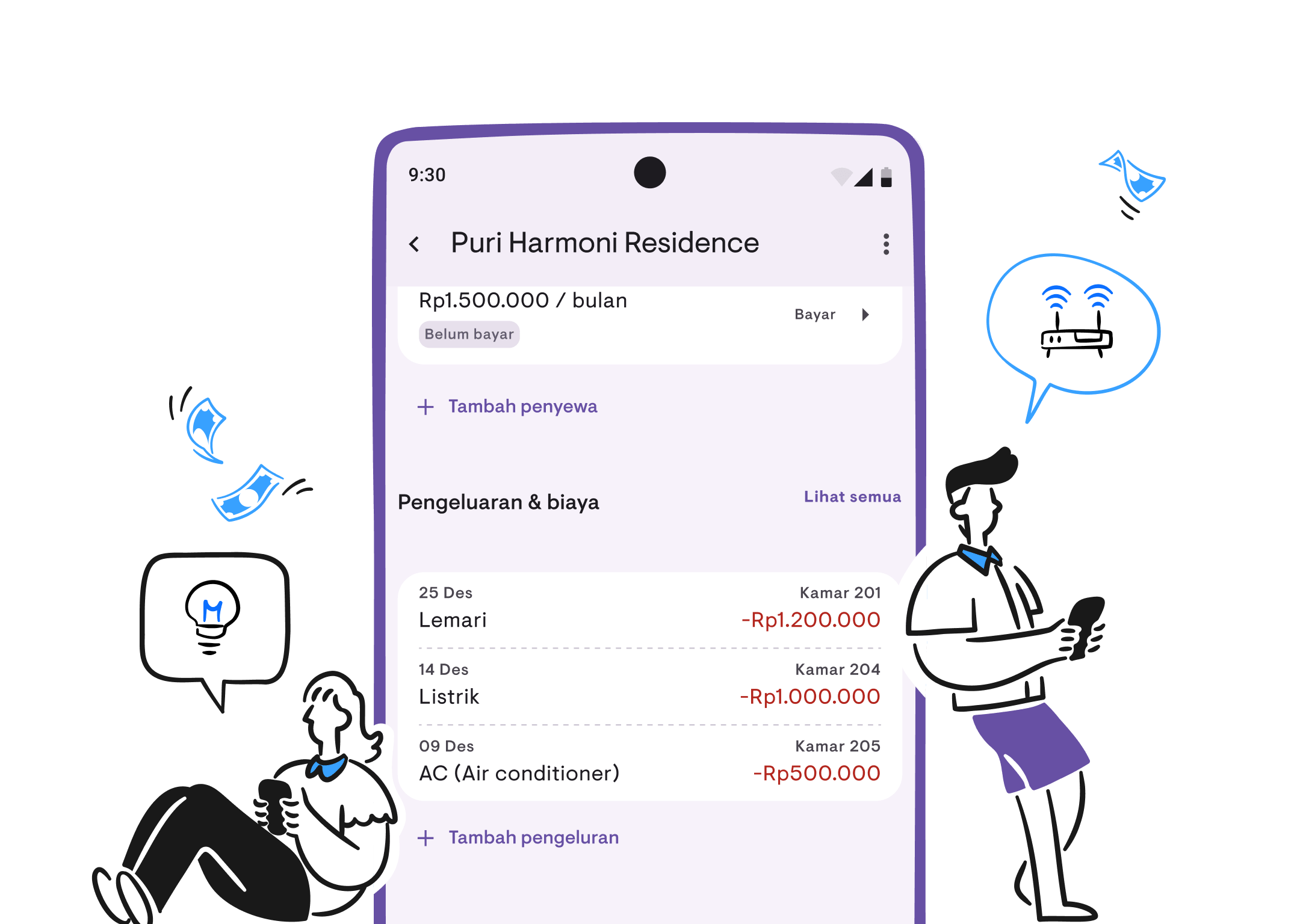
Track expenses, know your net income
Know how much income you made this month? Sure. But do you know how much you spent? Electricity, water, repairs, maintenance — it’s all either tracked manually or not tracked at all. So you never really know your net profit.
That’s why we’re happy to introduce Expense Tracking, now available in Kamaru.
Record expenses
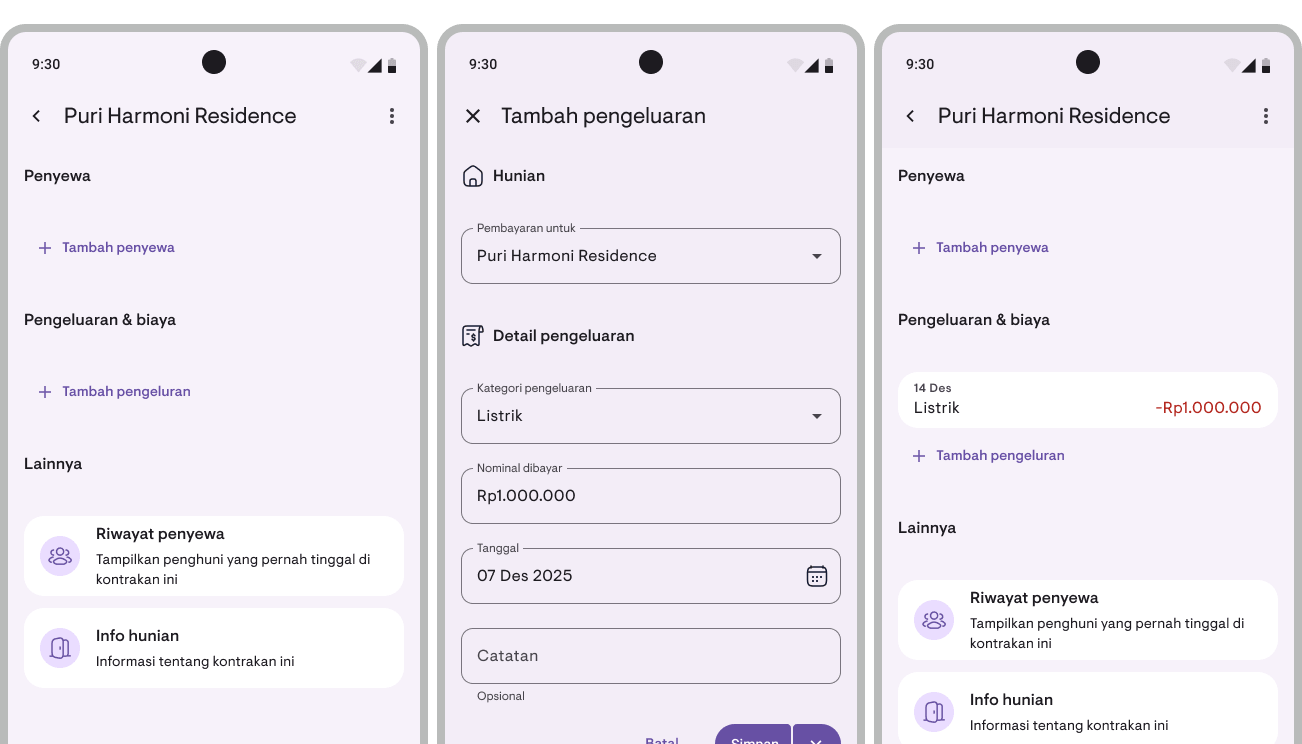
Record all your property expenses directly in Kamaru. Each expense can be linked to:
- Property — Expense for a specific property
- Room — Room-specific expense (optional)
- Category — Choose from 30+ built-in categories or create your own
- Amount, date, and notes — Fill in details as needed
Need to record multiple expenses at once? Use the Save & Add Another button to keep the form open after saving.
30+ built-in categories
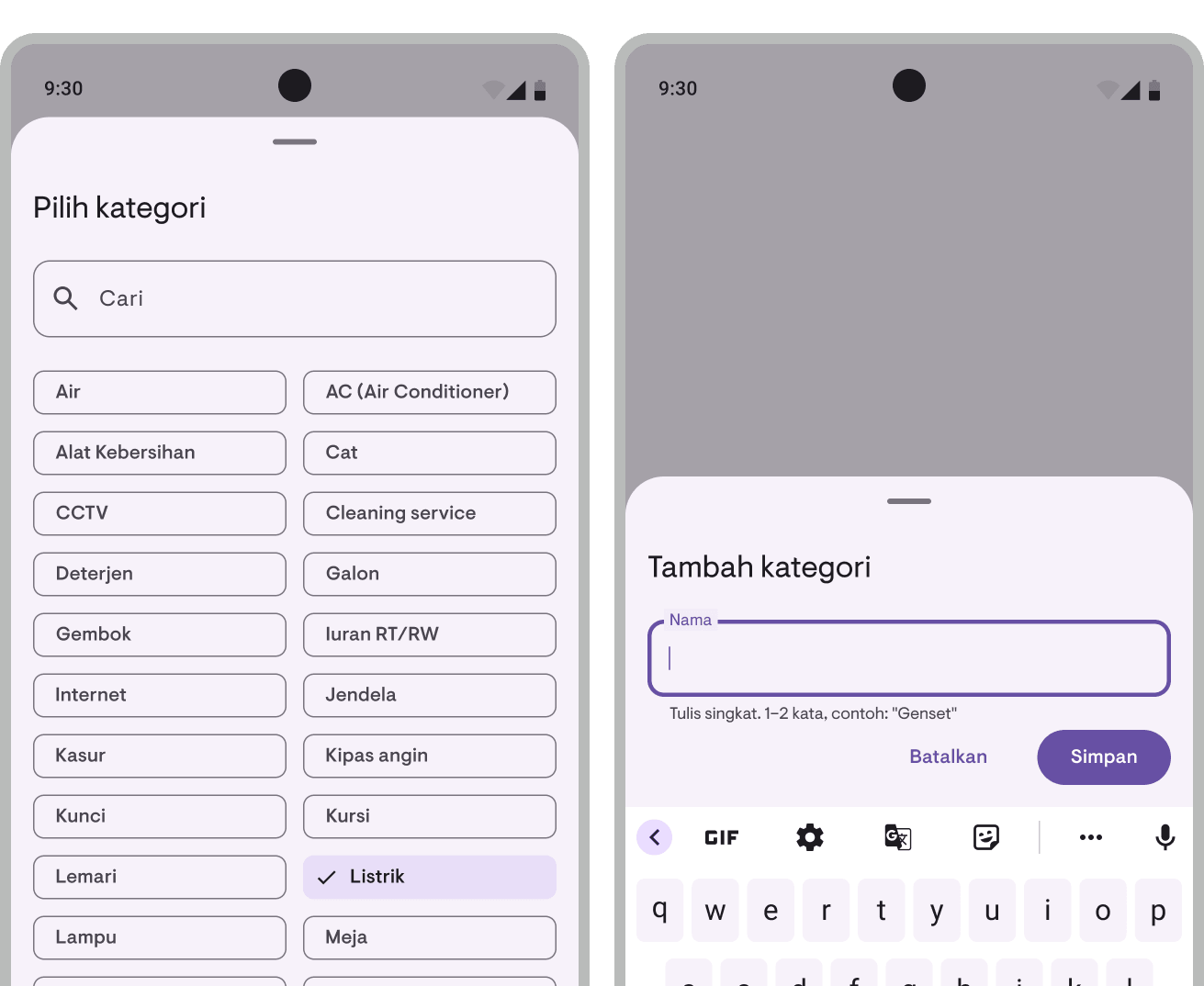
No need to create categories from scratch. Kamaru comes with 30+ categories commonly used by property owners:
Electricity, water, AC, internet, repairs, paint, labor, security, taxes, and many more.
Need a custom category? Just add a new one anytime. You can also rename or delete categories you don’t need.
Expense list
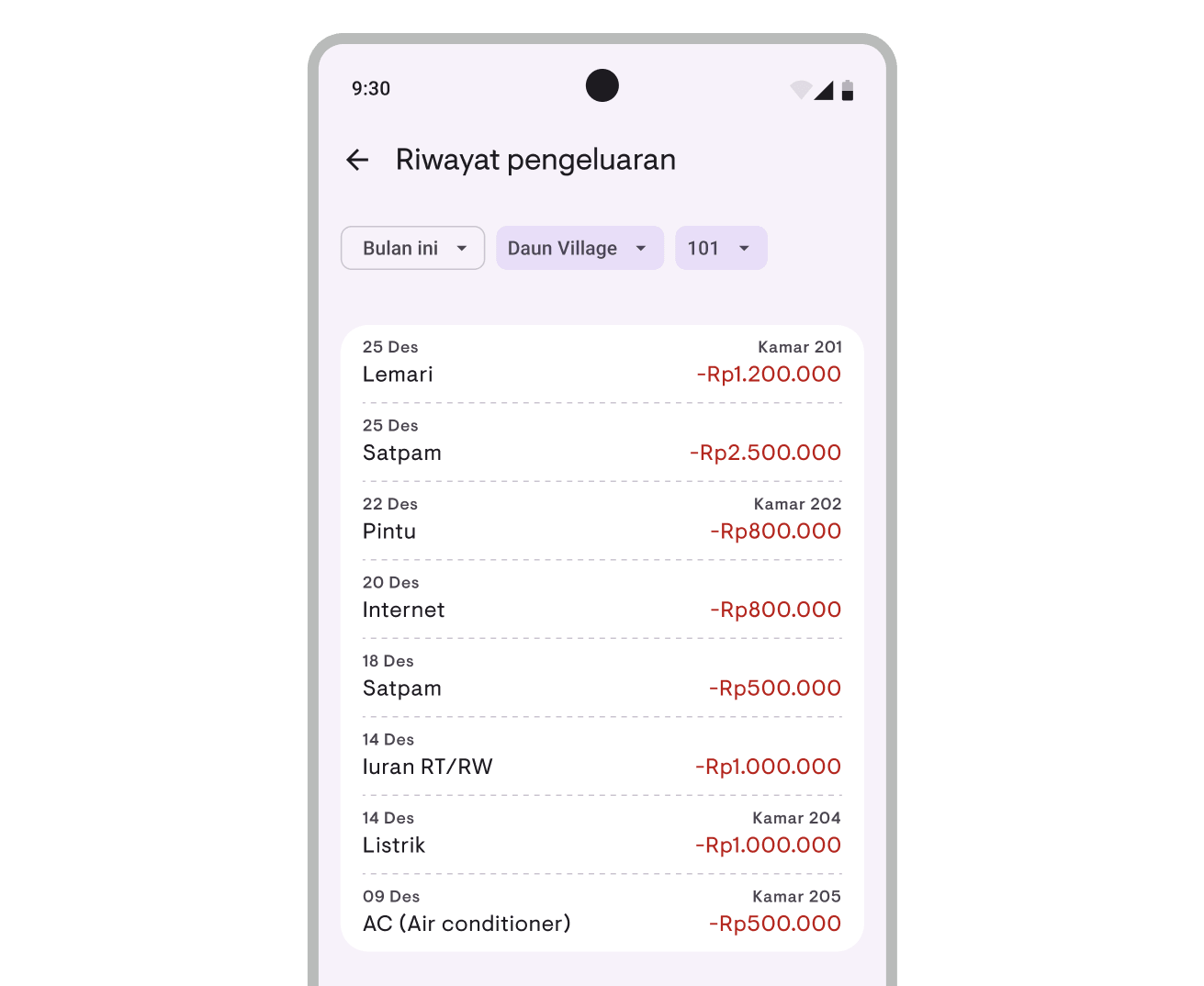
View all your expenses in a single filterable list:
- Period — This month, 3 months, 6 months, or 1 year
- Property — All properties or a specific one
- Room — All rooms or a specific one
Tap an expense to view details, or long-press to edit, duplicate, or delete.
Expenses in Report Overview
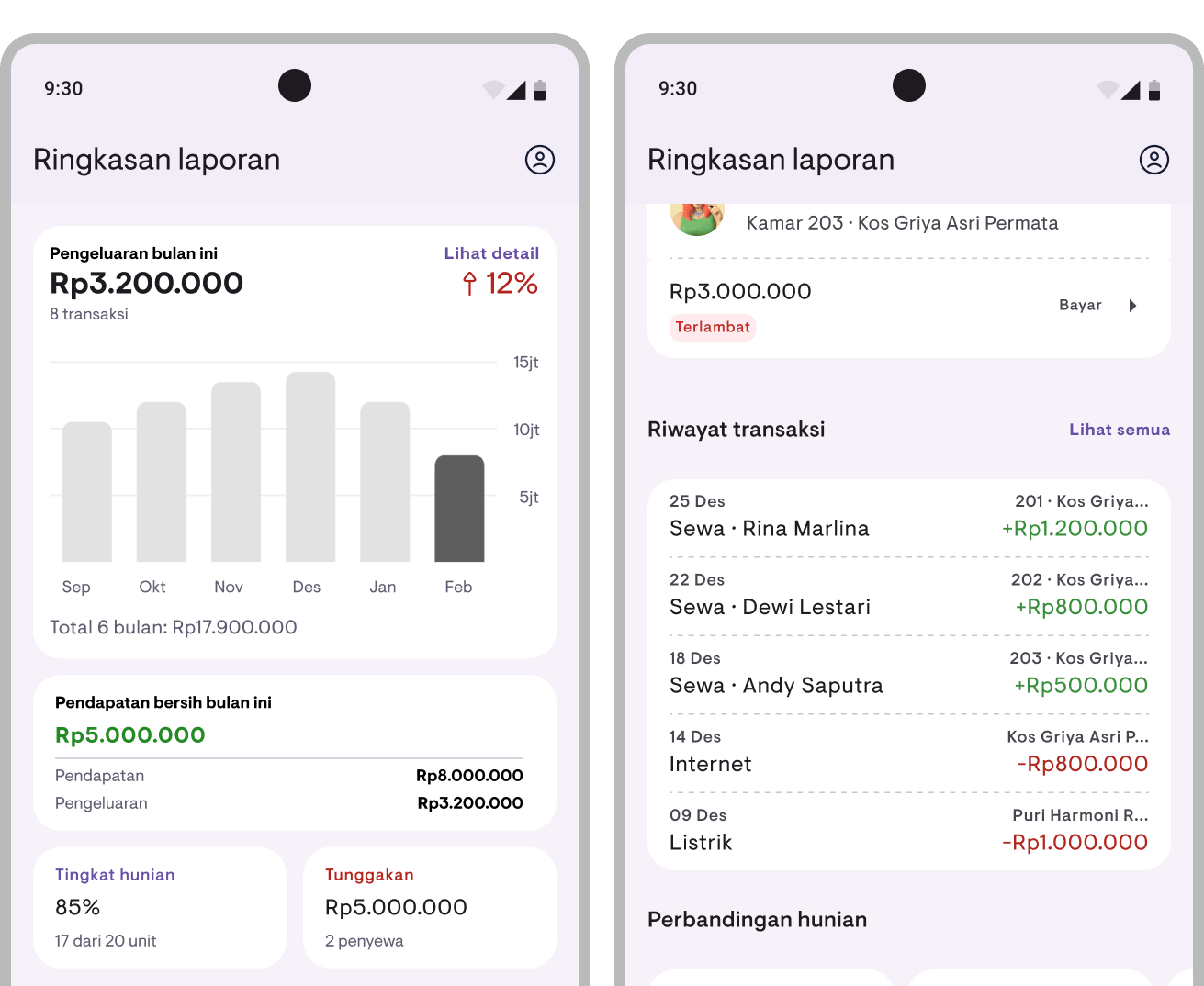
Expenses now also appear in the Report Overview:
- Total expenses — Total expenses for the current period with a bar chart showing 6 or 12 months’ trend, plus period-over-period comparison
- Net income — Income minus expenses, instantly see profit or loss
- Property comparison — Now shows expenses and net profit per property
Cash flow report
The cash report is now the Cash Flow Report with more detail:
- Mixed transactions — Income and expenses in one list, sorted newest first
- Type filter — Filter by “All”, “Income”, or “Expenses”
- Summary — Total income, total expenses, and net balance
PDF and CSV export
All reports that include expense data can be exported:
- Financial Report — Now includes expense breakdown by category and net income
- Cash Flow Report — Includes all income and expense transactions
Export format stays the same — PDF ready to print and CSV for spreadsheet analysis.
Available now
Expense Tracking is available in the latest version of Kamaru for Android and iOS. All expense recording and reporting features are available for Pro users. Free users can preview reports with sample data.
Update your app now!
For a complete guide on how to use expense tracking, see the Expense Tracking user guide.
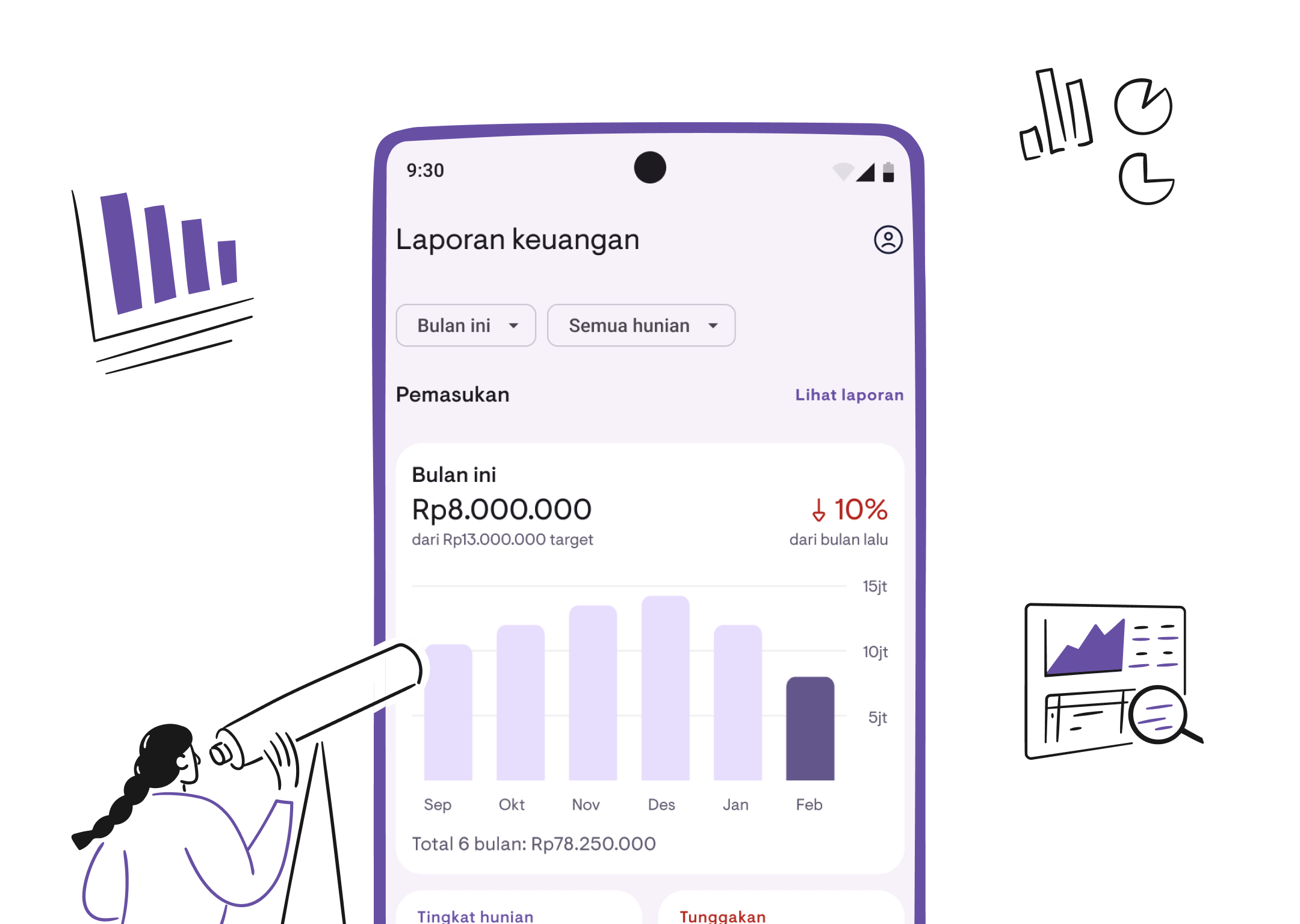
Introducing financial reports
Own multiple properties but unsure how much income you actually made this month? Who’s behind on rent? What’s your occupancy rate? Manually calculating from payment records is time-consuming and error-prone.
That’s why we’re excited to introduce Financial Reports, now available in Kamaru.
Report Overview
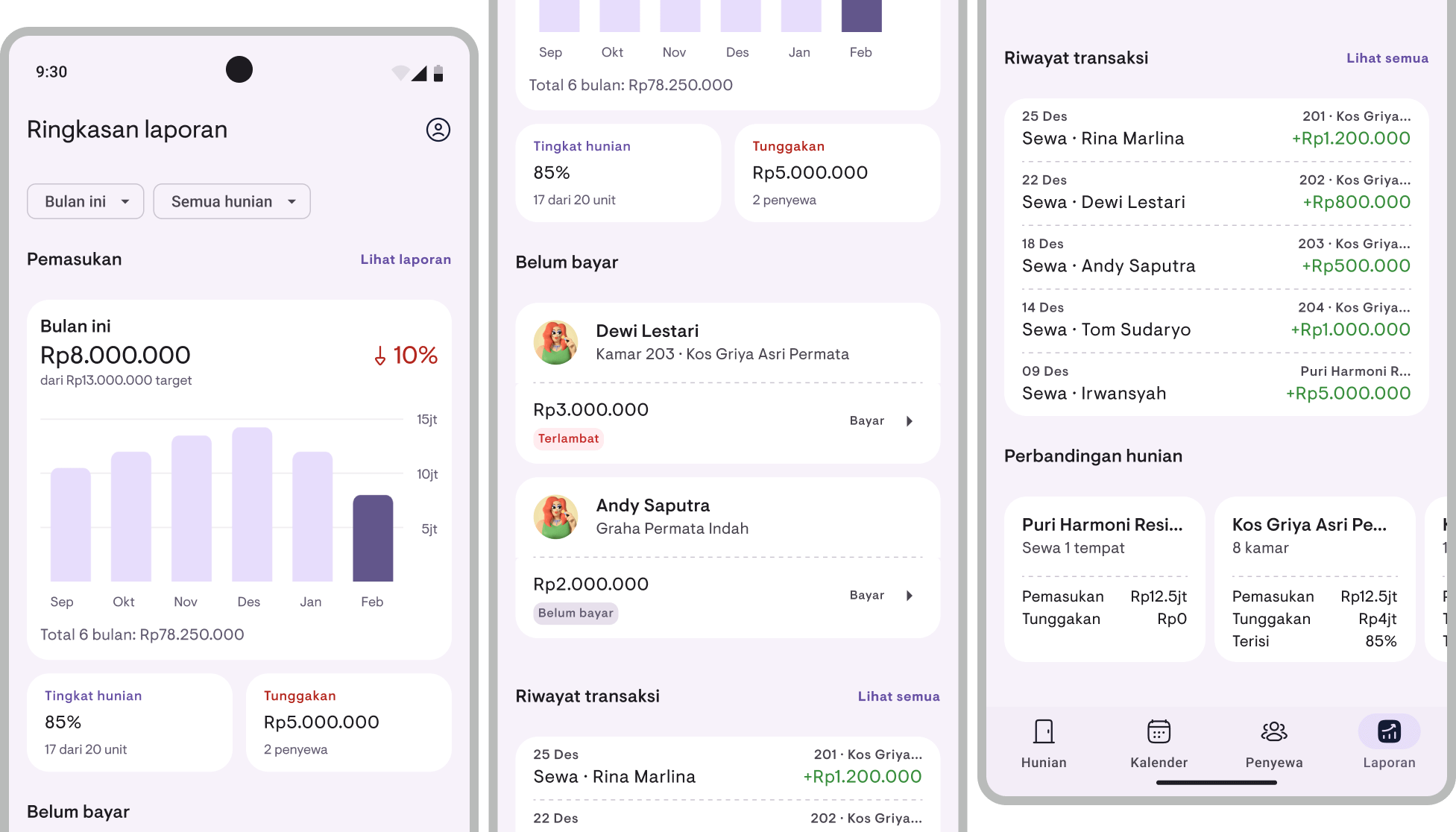
The Report Overview is your central hub for property financial information. Open the Reports tab in the bottom navigation bar and get the big picture at a glance:
- Income — Total income for the current period with a bar chart showing the last 6 or 12 months’ trend, plus month-over-month comparison (up or down by what percentage)
- Occupancy rate — Percentage of occupied units out of your total units
- Overdue payments — Total unpaid charges and how many tenants are behind
- Overdue tenants — List of tenants with overdue, partial, or unpaid status
- Recent transactions — Latest payments received
- Property comparison — Side-by-side cards comparing income, overdue amounts, and occupancy across properties
Period and property filters
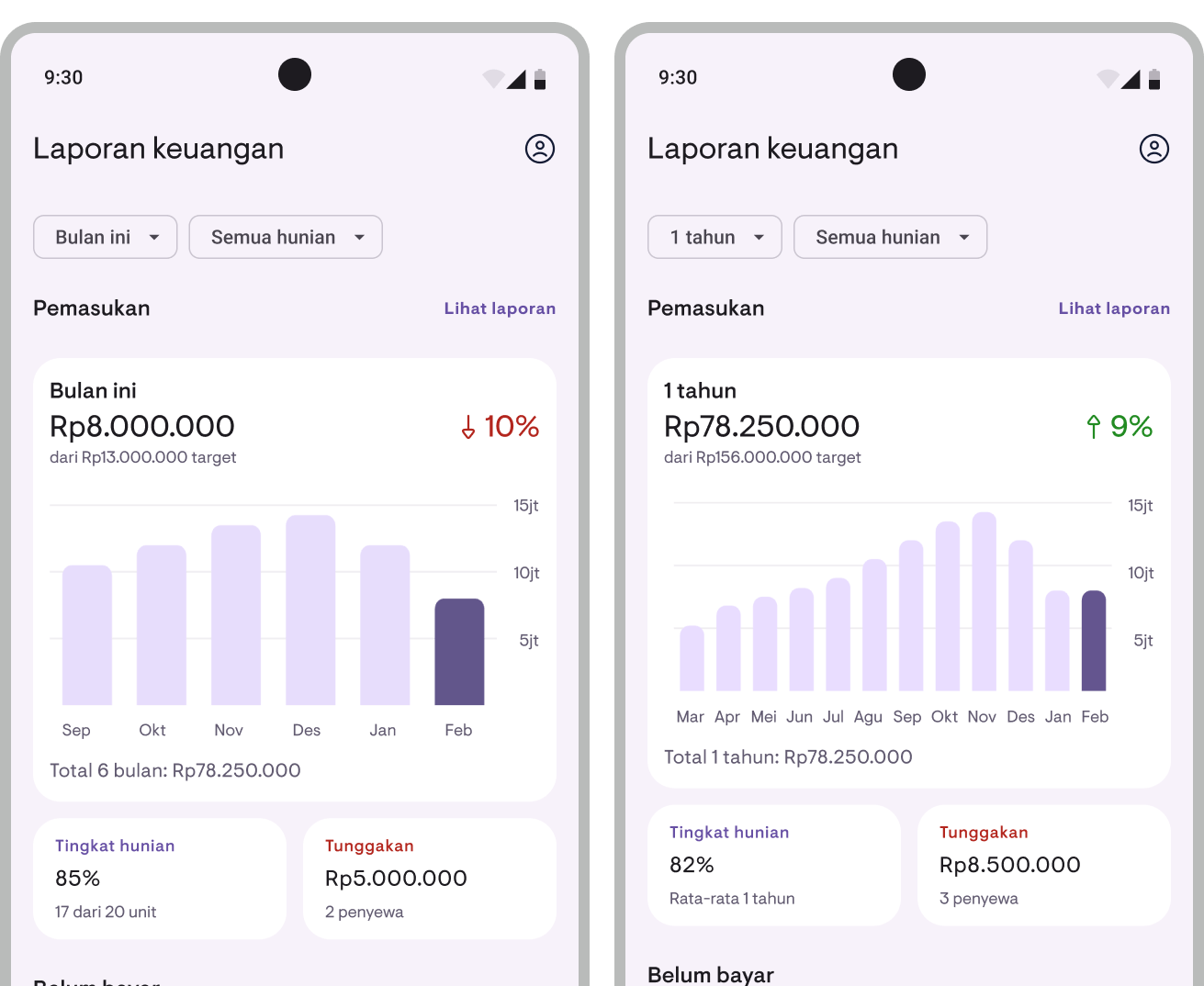
Customize the view to suit your needs:
- Period — Choose “This Month” for monthly data, or “1 Year” for rolling 12-month data
- Property — View all properties at once or filter by a specific property
Financial summary
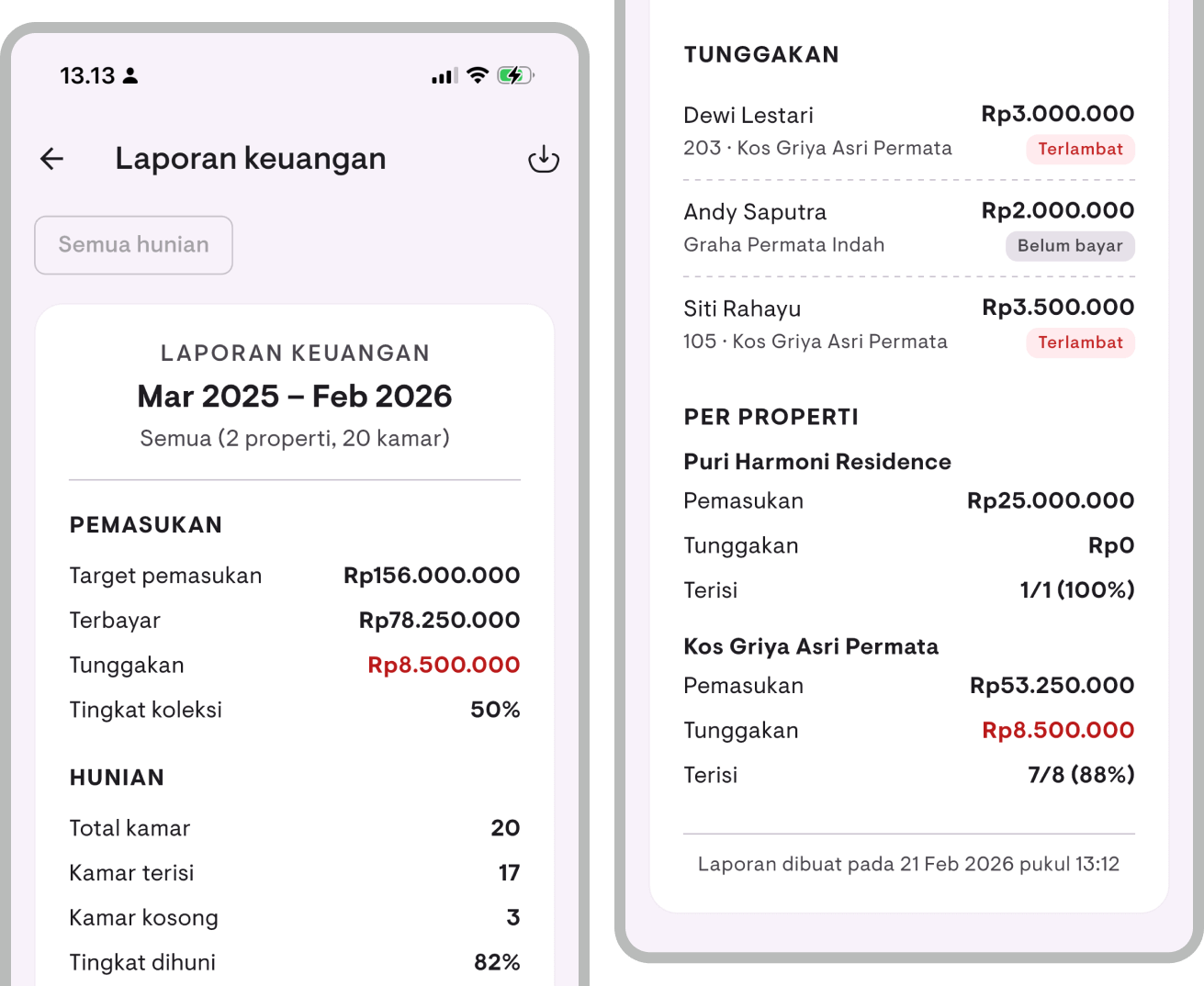
Need a more detailed report? Tap View Report on the Report Overview to go to the Financial Summary page. Here you can see:
- Target income vs collected income vs overdue amount
- Collection rate — Percentage of income successfully collected
- Occupancy details — Total rooms, occupied, vacant, and occupancy percentage
- Overdue list — Tenant name, location, property, overdue amount, and payment status
- Per-property breakdown — Income, overdue amounts, and occupancy for each property
Filter by month and property for more specific analysis.
Cash report
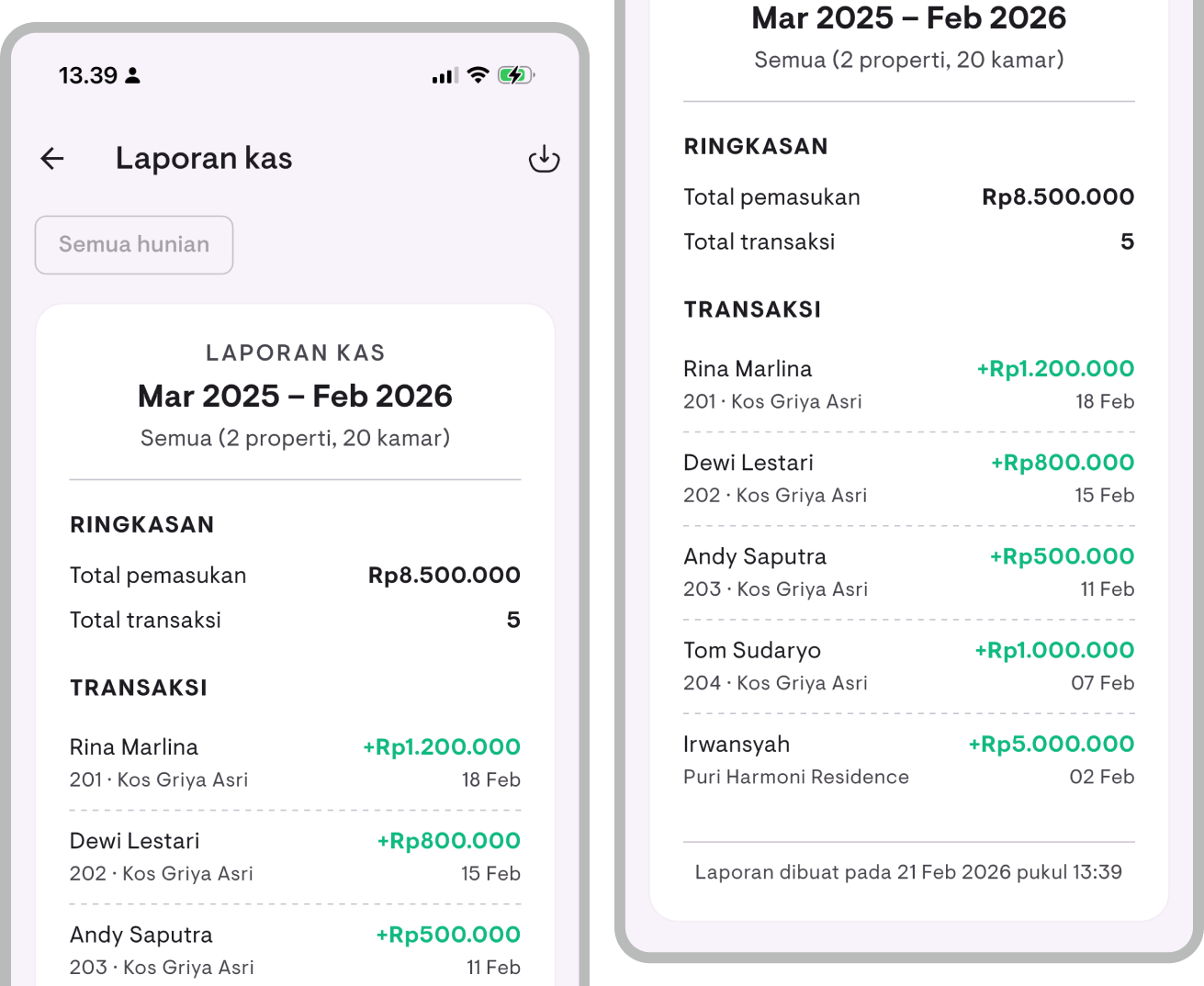
Want to see detailed incoming transactions? Open the Cash Report from the Report Overview. This report shows:
- Total income and number of transactions within the selected period
- Full transaction list — Tenant name, location, payment amount, and date
Great for reconciliation or cross-checking against your bank statements.
PDF and CSV export
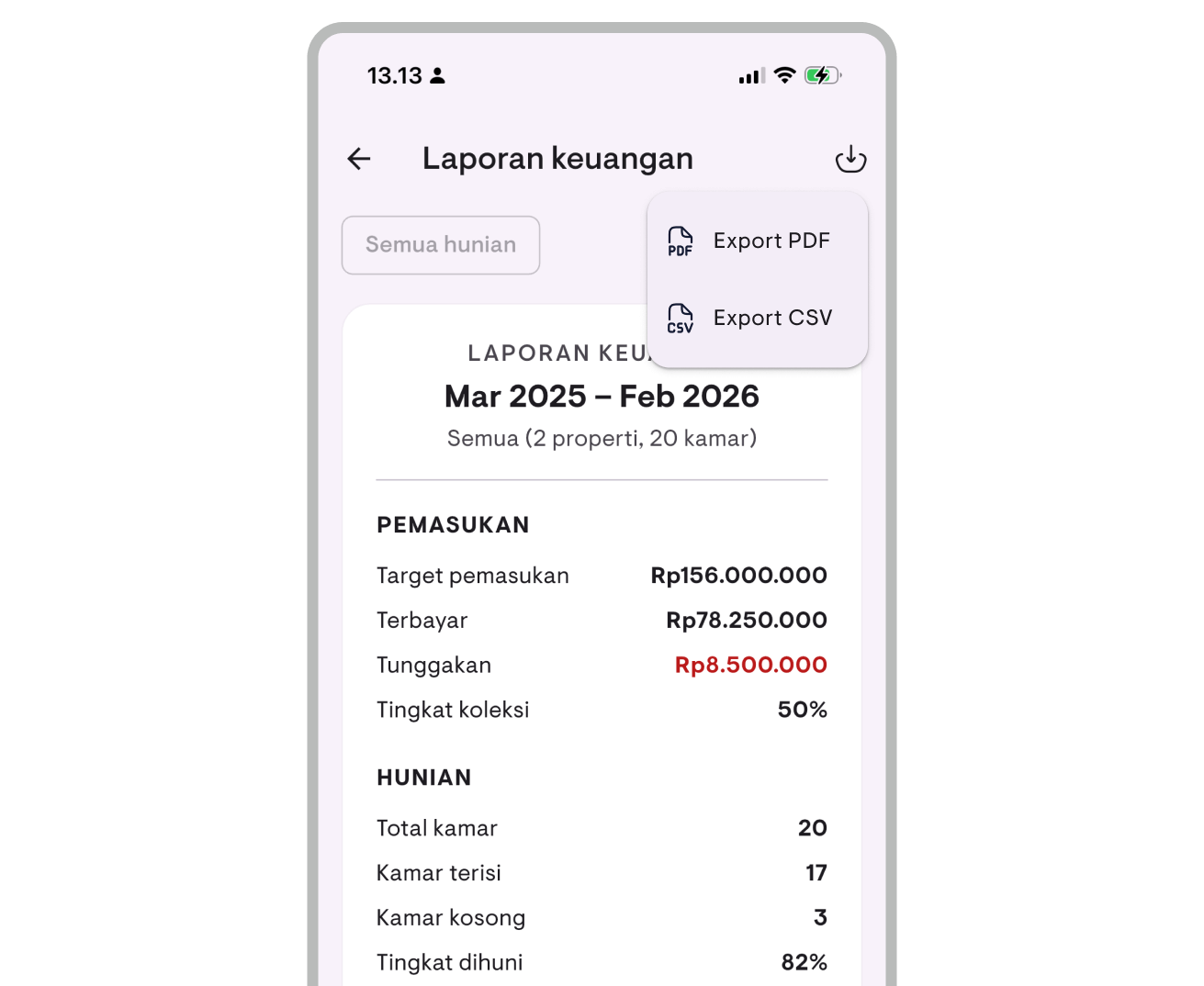
All reports can be exported:
- PDF — Print-ready format, easy to share with partners or keep as records
- CSV — Spreadsheet format, ready to open in Excel or Google Sheets for further analysis
Tap the share or download button on the report page, and the file is ready to send or save.
Available now
Financial Reports are available in the latest version of Kamaru for Android and iOS. All report features — Report Overview, Financial Summary, Cash Report, and export — are available for Pro subscribers. Free users can preview the feature with sample data.
Update your app now!
For a complete guide on how to use financial reports, see the Financial Reports user guide.
Kamaru is now available on iOS!
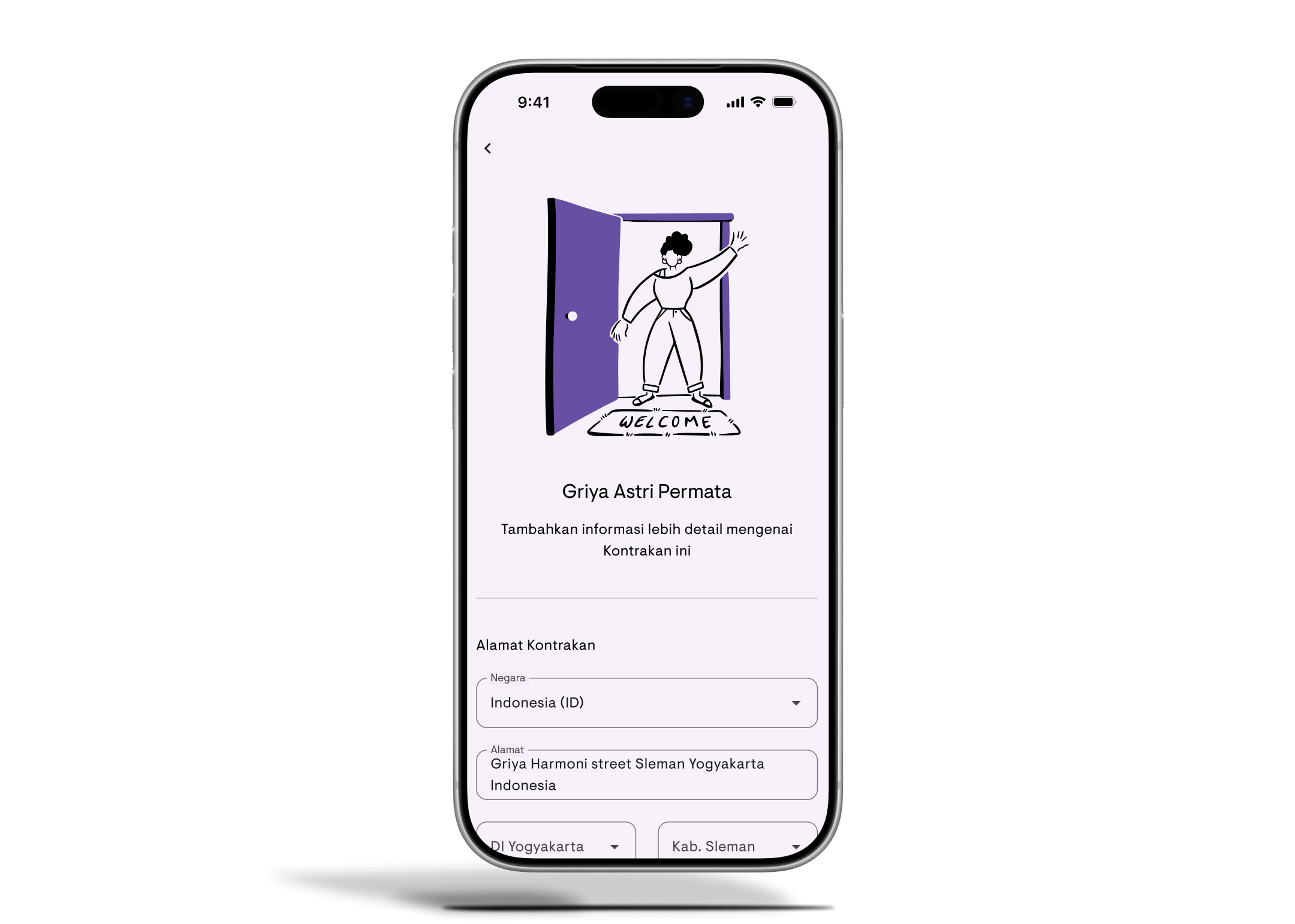
Great news! Kamaru is now available on iOS! After launching on Android a few months ago, our property management app is officially available on the App Store for iPhone and iPad users.
All the features, now on your iPhone
If you’ve been waiting for the iOS version, the wait is over. Kamaru on iOS has all the same features as the Android version—nothing left out.
Features available
Property & room management
Organize all your properties in one place. Add houses, apartments, boarding houses, villas, hotels, and more. For properties with multiple units, track each room individually with its own status and pricing.
AI-powered tenant registration
Add tenants in seconds using our smart ID scanning feature. Just photograph their ID card, driver’s license, or passport—Kamaru automatically extracts their name, ID number, date of birth, and other details. No more tedious manual data entry.
Lease tracking
Keep track of who’s renting what. Record check-in dates, rental prices, and payment periods (daily, weekly, monthly, or yearly). See at a glance which properties and rooms are occupied or vacant.
Payment tracking
Record rent payments, monitor status (paid, partial, overdue), and see a breakdown of which periods are covered. Set grace periods and currency to match your needs.
Occupancy calendar
View all leases across your properties in a visual timeline. Identify vacant periods and manage leases directly from the calendar.
Financial reports
View your property financial summary, generate cash reports, and export data for your bookkeeping needs. See the full details.
Cloud backup
Your data is securely stored in the cloud, so you can access it from any device. Log in on your iPhone, iPad, or Android device and pick up right where you left off.
Multi-language support
Use Kamaru in English or Bahasa Indonesia—whichever you prefer.
Download now
Ready to simplify your property management? Download Kamaru from the App Store today.
New to Kamaru? Check out our complete getting started guide to set up your first property in minutes. And if you’re a first-time landlord, don’t miss our 5 essential tips for property management.
What’s next?
We’re continuing to improve Kamaru. Here’s what we’re working on:
- Payment reminders
- Push notifications for important updates
Have suggestions? We’d love to hear from you!
Thank you for being part of the Kamaru community. We can’t wait to see how you use the app to simplify your property management.
Track rental payments with ease
Managing rental payments from multiple tenants can get messy. Who’s paid? Who’s late? Which periods are covered? Tracking it all manually in spreadsheets or notebooks makes it easy to miss payments or miscalculate.
That’s why we’re excited to introduce Payment Tracking, now available in Kamaru.
Record payments in seconds
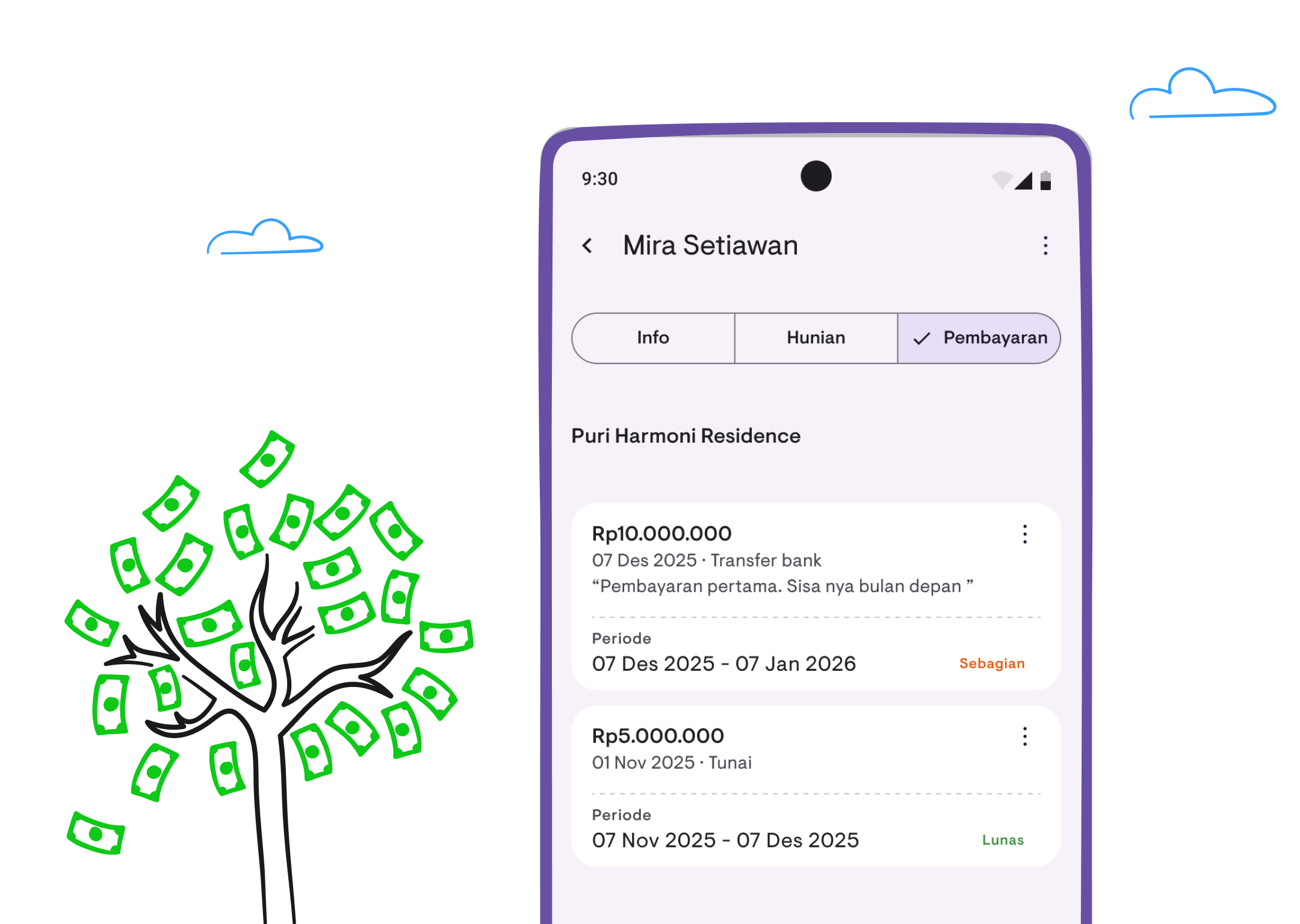
Adding a new payment only takes a few taps. Select the lease, enter the amount, choose the method (cash or transfer), and save. Kamaru automatically calculates the payment status and which periods are covered.
Automatic payment status
No more manually checking who’s paid. Kamaru displays payment status with color-coded badges:
- Unpaid (gray) — No payment recorded yet
- Partial (yellow) — Some payment made but not fully paid
- Paid (green) — Payment complete
- Late (red) — Past the grace period (tolerance window after due date)
These badges appear everywhere: in the property list, tenant cards, and lease details. You can instantly see which ones need follow-up.
Payment period breakdown
Each time you record a payment, Kamaru shows which periods will be covered. If a tenant pays for 2 months at once, you can see the breakdown before confirming.
This is especially useful for tracking partial payments or advance payments covering multiple periods.
Payment settings
Customize settings to match your needs:
- Late status — Set how many days/weeks before a payment is considered late. You can also turn it off entirely if you’d rather skip “Late” labels (handy when you tolerate a day or two of slippage)
- Currency — Choose from 16 currencies including IDR, USD, SGD, MYR, and more
Other improvements
Night stay counter
The “Occupied” badge in the property list is now replaced with a night counter. You can see how many nights a lease covers—or an infinity symbol (∞) for open-ended leases.
Quick action menu
Long-press on a property or room card for quick access to Edit, Duplicate, or Delete. No need to open details first for simple actions.
Tenant contact shortcuts
On the tenant detail page, there are now direct buttons for WhatsApp, phone, SMS, and email. Communicating with tenants just got easier.
Available now
Payment Tracking and all the improvements above are available in the latest version of Kamaru for Android and iOS. Update your app today!
For a detailed walkthrough on how to use payment tracking, check out our Payment Tracking user guide.
May 2026 update — Payment status is now calculated per period, not cumulatively. Once a tenant pays month 1 in full, the lease shows “Paid” for that period; when month 2 begins, it automatically flips back to “Unpaid” with no manual reset. The old “Grace period” setting was renamed to “Late status” and can also be turned off entirely. Details in our v1.6.1 release post.
Introducing the occupancy calendar
Managing multiple properties means juggling countless lease dates, tenant schedules, and vacant periods. Keeping track of it all in your head—or worse, on paper—can quickly become overwhelming.
That’s why we’re excited to introduce the Occupancy Calendar, now available in Kamaru.
See your entire portfolio at a glance
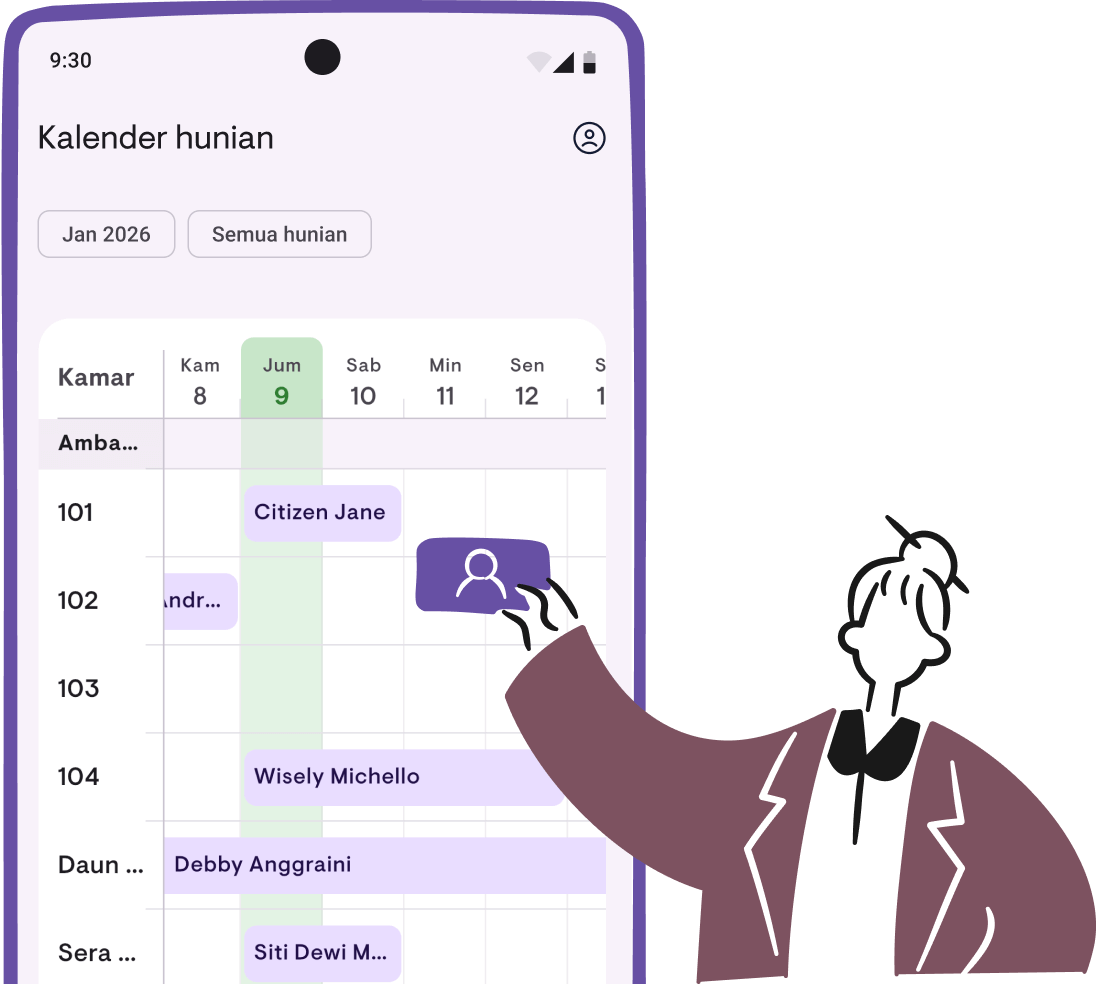
The Occupancy Calendar gives you a visual timeline of all your leases across every property. No more switching between screens or checking individual rooms to find out who’s staying where and when.
- View occupancy schedules in a horizontal timeline
- See all properties together or filter by specific property and room
- Quickly identify vacant periods and overlapping leases
Manage leases directly from the calendar
The calendar isn’t just for viewing—it’s built for action. Tap any date to add a new lease, or tap an existing lease to see tenant details. Everything you need is just a tap away.
Works for all rental types
Whether you rent out entire properties or individual rooms, the calendar adapts to your setup. Whole-property rentals show as a single timeline, while per-room properties display each room separately.
Available now
The Occupancy Calendar is available in the latest version of Kamaru on both Android and iOS. Update your app to start using it today.
For a detailed walkthrough on how to use the calendar, check out our Occupancy Calendar user guide.
May 2026 update — The calendar now has three view modes: Daily, Weekly, and Monthly. Ideal for long-term leases or seeing your entire portfolio in one screen. Details in our v1.6.1 release post.
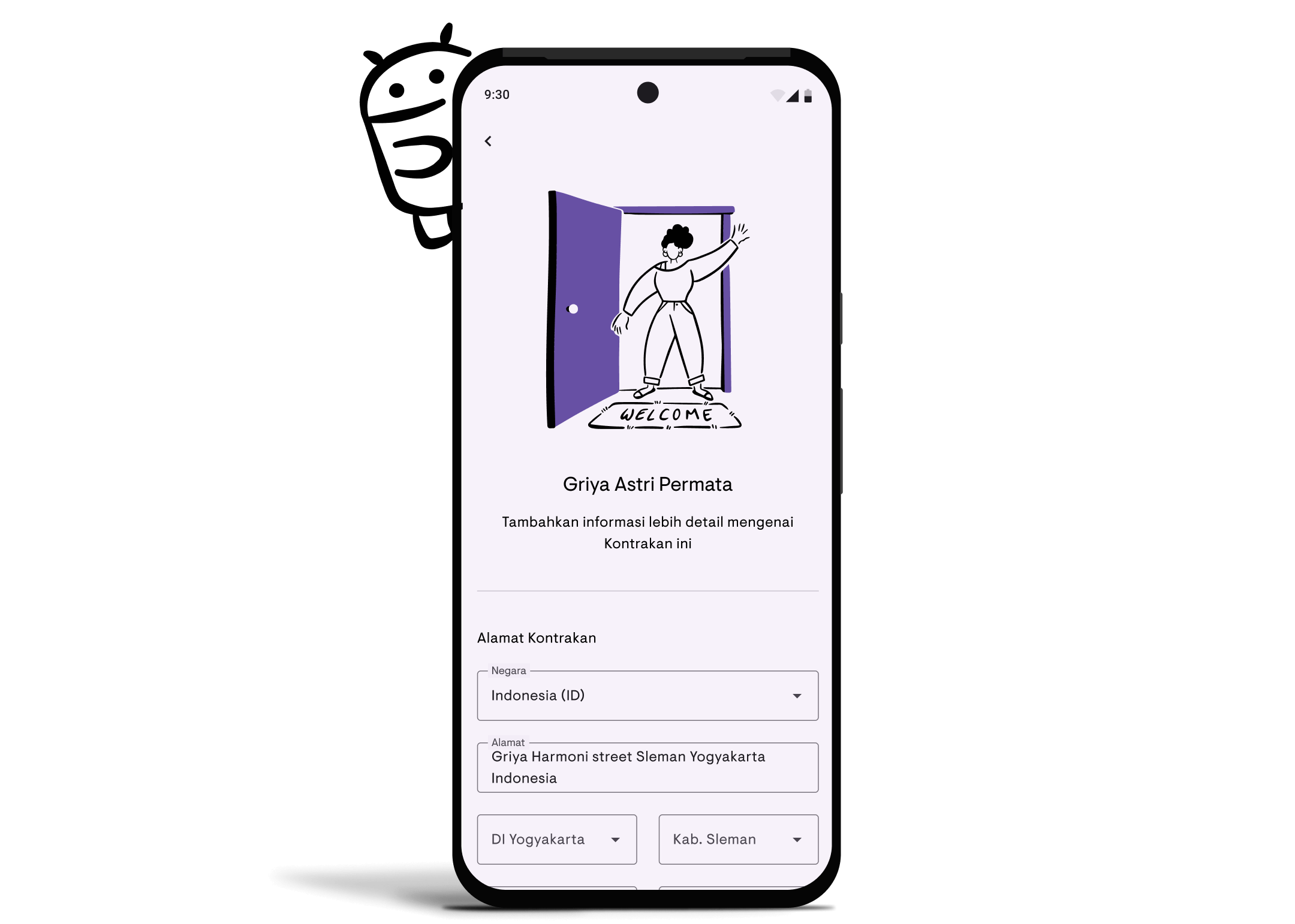
Kamaru is now available on Android!
We’re thrilled to announce that Kamaru is now available on Android! After months of development and testing, our property management app has officially launched on the Google Play Store.
Your properties, now in your pocket
Whether you’re managing a single rental unit or an entire portfolio, Kamaru for Android brings all the tools you need right to your fingertips. No more waiting until you’re back at your desk—manage everything on the go.
Core features available on Android
Property & room management
Organize all your properties in one place. Add houses, apartments, boarding houses, villas, hotels, and more. For properties with multiple units, track each room individually with its own status and pricing.
AI-powered tenant registration
Add tenants in seconds using our smart ID scanning feature. Just photograph their ID card, driver’s license, or passport—Kamaru automatically extracts their name, ID number, date of birth, and other details. No more tedious manual data entry.
Lease tracking
Keep track of who’s renting what. Record check-in dates, rental prices, and payment periods (daily, weekly, monthly, or yearly). See at a glance which properties and rooms are occupied or vacant.
Cloud backup
Your data is securely stored in the cloud, so you can access it from any device. Log in on your phone or tablet and pick up right where you left off.
Multi-language support
Use Kamaru in English or Bahasa Indonesia—whichever you prefer.
Download now
Ready to simplify your property management? Download Kamaru from the Google Play Store today.
New to Kamaru? Check out our complete getting started guide to set up your first property in minutes. And if you’re a first-time landlord, don’t miss our 5 essential tips for property management.
What’s next?
We’re just getting started. Here’s what we’re working on:
Payment tracking— See the user guide- Payment reminders
Financial reports— Now available! Check out the announcement and user guideCalendar view for bookings— Now available! Check out the occupancy calendar announcement and user guide- Push notifications for important updates
Have suggestions? We’d love to hear from you!
Thank you for being part of the Kamaru community. We can’t wait to see how you use the app to simplify your property management.